The AI MCP architecture is a client-server model that connects AI applications to external data and tools through one standard protocol. Instead of building a custom integration for every pair of AI application and data source (the N × M problem), teams build one MCP server per data source and any MCP-compatible application can use it.
The architecture has three components: the host (the AI application the user works in), the client (the connection layer inside the host) and the server (the program that exposes a data source or tool). Servers offer three primitives: tools, resources and prompts. Separating the AI application from the data access layer keeps integrations reusable across applications and lets enterprises keep access control on their own systems.
For a general introduction, see What Is AI MCP? Model Context Protocol, the "USB-C" of AI
The 3 Core Components of AI MCP Architecture
MCP splits the work between three components. Knowing where each one's responsibility ends is the first step to a clean integration.
MCP Host
The host is the AI application the user interacts with, such as Claude Desktop, an IDE like Cursor or VS Code, or a custom enterprise agent. The host connects to the language model, manages the conversation context and the user interface, and decides, based on the model's output, which tool calls to run and which ones need user approval. It creates and manages one MCP client for each server it connects to.
MCP Client
The client is the connection component inside the host. Each client keeps a one-to-one connection with a single MCP server. This isolation is intentional: authentication, errors and transport settings for one data source do not leak into another. The client handles JSON-RPC 2.0 messages and sends the protocol version and its capabilities with each request.
MCP Server
The server is a program that exposes a specific data source or tool to AI applications. It translates MCP requests into the underlying system's own calls, such as REST, SQL or GraphQL. For example, a PostgreSQL MCP server turns a tools/call request into a SQL query.
Local servers (stdio) run with the permissions of the user who launched them; remote servers (Streamable HTTP) typically use OAuth to authorize the client. MCP architecture has two layers: the data layer, which defines JSON-RPC 2.0 messages, lifecycle and primitives, and the transport layer, which handles communication between clients and servers. It uses stdio for local servers and Streamable HTTP for remote servers.
MCP Primitives: Tools, Resources and Prompts
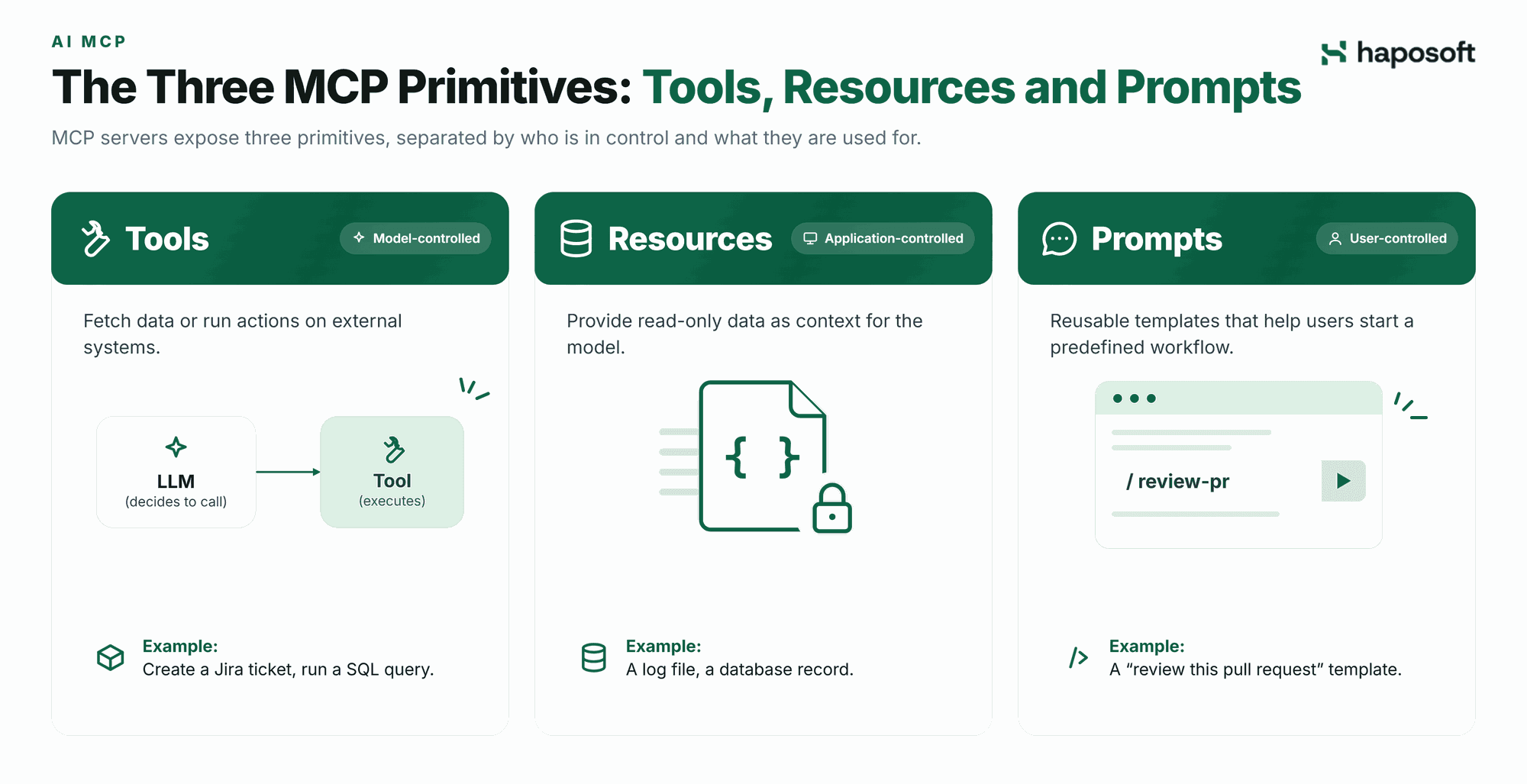
MCP servers expose three primitives. The MCP specification separates them by who is in control: tools are model-controlled, resources are application-controlled and prompts are user-controlled.
| Primitive | Controlled by | Purpose | Example |
|---|---|---|---|
| Tools | The model | Fetch data or run actions on demand | Create a Jira ticket, run a SQL query |
| Resources | The host application | Provide read-only context | A log file, a database record |
| Prompts | The user | Start a predefined workflow | A "review this pull request" template |
Resources: The Context Layer
Resources are read-only data that the host can attach as context, so the model works from real data instead of guessing.
- URI identification: each resource has a URI, such as file:///var/log/syslog or postgres://db/users/123, so hosts request data the same way across servers.
- MIME types: resources can be text or binary. The server declares the MIME type (for example text/plain, application/json or image/png) so the host can handle the content correctly.
- Subscriptions (optional): if the server supports it, the client can subscribe to a resource and receive a notifications/resources/updated message when it changes, instead of polling.
Tools: The Action Layer
Tools let the model run code, call external APIs or change data. This is where the AI moves from reading to acting, so tool design needs clear limits.
- Name, description and input schema: every tool declares a JSON Schema for its arguments. The model relies on the tool's name, description and schema to decide when and how to call it.
- Execution safety: the server runs the tool. Production servers should enforce timeouts, permission checks and, where relevant, sandboxing. The host should ask the user to approve calls that change data.
- Results and errors: the server returns results as content items (text, images or structured data). If the tool itself fails, the result is marked isError: true with an explanation, so the model can adjust and retry. JSON-RPC errors are reserved for protocol problems, such as an unknown tool.
Prompts: The Interaction Layer
Prompts are reusable templates that the server offers and the user chooses, often as slash commands or menu items. They help users start complex tasks without knowing which tools and resources to combine.
- Arguments: prompts accept defined arguments, such as a repository name or a date range.
- Message assembly: when invoked, a prompt returns one or more messages for the conversation and can embed resources as context.
- Discovery: clients list available prompts with prompts/list, giving users a menu of ready-made workflows.
AI MCP Architecture Diagram
An AI MCP architecture diagram (or AI MCP diagram) shows the path of a request from the user to an external system and back. The key point it shows: one host runs a separate client for each server.
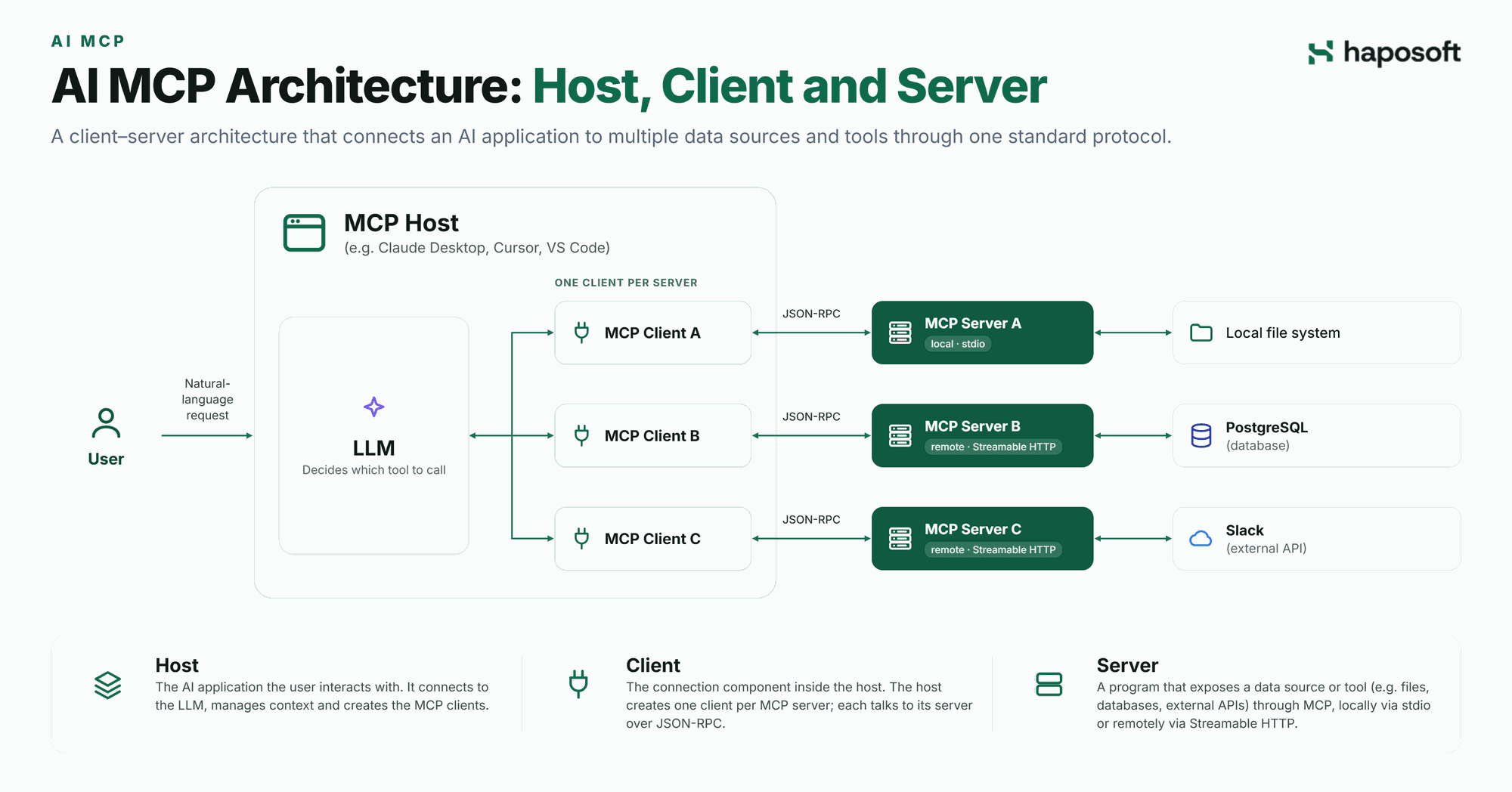
In short: the host gives the model the list of available tools, the model chooses a tool, the host routes the call through the matching client, and the server runs it against the external system and returns a structured result. The lifecycle below explains each stage.
MCP Connection Lifecycle: How Components Connect
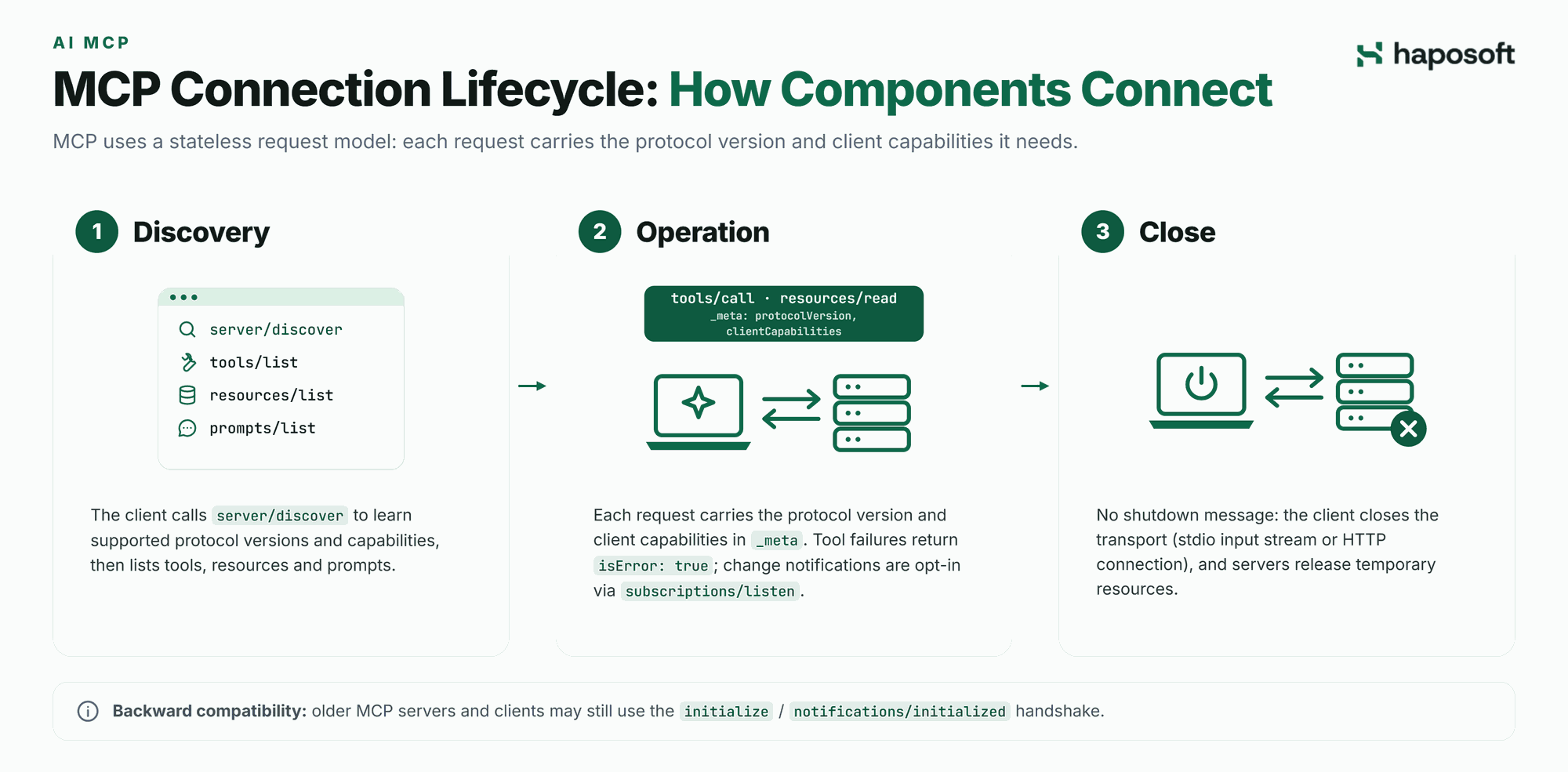
MCP uses a stateless request model in which each request carries the protocol version and client capabilities needed to process it. Clients can discover a server's supported versions and capabilities before sending requests. Unlike earlier versions, the current protocol does not require a connection-level initialization handshake or maintain protocol-level sessions.
1. Discovery
Before making requests, the client can call server/discover to learn which protocol versions the server supports, its identity, and the capabilities it offers. This allows the client to select a compatible protocol version. The client then discovers available functionality through tools/list, resources/list, and prompts/list. The server returns the available items, including their names, descriptions, and input schemas for tools.
2. Operation
The client sends requests with the selected protocol version and its capabilities in _meta, using io.modelcontextprotocol/protocolVersion and io.modelcontextprotocol/clientCapabilities. Clients should also identify themselves through io.modelcontextprotocol/clientInfo.
The model can select a tool, and the host forwards the request through the appropriate MCP client using tools/call. It can also retrieve data using resources/read. The server processes each request and returns a result, including its identity in result metadata.
For ongoing change notifications, clients can opt in through subscriptions/listen. This stream supports notifications for changes to tool, prompt, and resource lists, as well as resource subscriptions. It replaces the previous resources/subscribe and resources/unsubscribe methods. Tool execution failures, such as a database timeout, are returned as results with isError: true, allowing the model to handle or retry them. JSON-RPC errors indicate protocol-level or request-level problems.
3. Close
MCP has no dedicated shutdown message or protocol-level session to terminate. The client and server close the underlying transport when communication is complete. With stdio, the client closes the server's input stream, allowing the server process to exit. With Streamable HTTP, the client closes the relevant HTTP connection or response stream. Servers should release temporary resources, such as database connections or file locks, when appropriate.
Backward compatibility: Older MCP servers and clients may still use the initialize / notifications/initialized handshake defined in earlier protocol versions.
Architecture Trade-offs
The host-client-server split pays off when several AI applications need the same systems, but it is not free.
- More moving parts: each server is another process or service to deploy, monitor and update. For one application calling one stable API, direct integration is often simpler.
- Context cost: every tool's name, description and schema is sent to the model. Connecting many servers with many tools uses context space and can make tool choice less accurate, so expose only the tools a use case needs.
- Trust boundaries: a server's tool results go straight into the model's context. Review third-party servers, pin their versions and give each server a least-privilege account.
Example: One Host, Several Business Systems
Haposoft has built MCP servers for its own products, including Hapo ERP (an ERP for fastener manufacturers), Hapo SMS and Hapo OKR. Each system has its own server and a single host, Claude, connects to all of them through separate clients. Users can check production orders and inventory, review sales pipelines and payment status, or submit OKR check-ins from one place. The servers run remotely, and each user signs in with OAuth, so access follows that user's own permissions. The servers expose no tools for deleting or approving records, and any change to data requires confirmation.
FAQ: Common Questions About AI MCP Architecture
What is the difference between an MCP host and an MCP client?
The host is the AI application the user works in, such as an IDE or chat app. The client is a component inside that host that handles the connection to one MCP server. The host manages the interface, the model and approvals; each client handles communication with its server.
Can one MCP host connect to multiple servers?
Yes. A host creates one client per server, so a single application can connect to several data sources at once, for example a local file system server and a remote PostgreSQL server.
How do I read an AI MCP architecture diagram?
Follow the requests: the host, through its clients, sends requests such as tools/call or resources/read, and servers return structured results. The diagram separates the AI application (host and model) from the data access layer (servers and the systems behind them).
Which primitive should I use: a tool, a resource or a prompt?
Use a tool when the model should decide to take an action or fetch data on demand, a resource when the application should attach known context, and a prompt when users need a repeatable, predefined workflow.
Conclusion
The AI MCP architecture gives teams a standard way to connect AI applications to external data and tools: hosts manage the user and the model, clients manage one connection each, and servers expose tools, resources and prompts. This separation makes integrations reusable across AI applications and keeps access control on your own systems. For the full specification, see the official Model Context Protocol documentation.
Planning MCP servers for your enterprise systems? Talk to Haposoft's AI MCP team about secure MCP integrations for your internal systems, in the cloud or on-premise.