Legacy migration is the process of moving an outdated application, database or infrastructure to a modern, supported environment, such as the cloud or a newer platform, while keeping the business logic and data the organization still relies on. Depending on the strategy, the code may move almost unchanged (rehost) or be partly or fully rebuilt (refactor).
Organizations usually start a legacy migration when keeping the old system becomes more costly or risky than moving it: vendor support ends, security patches stop, or the system blocks new integrations. If a system is stable, low-risk and rarely changed, keeping it for now can be the better choice.
Legacy Migration Meaning: What Counts as a Legacy System?
A legacy system is an application, database or infrastructure that the business still depends on but that has become hard to maintain, secure or connect to newer tools. Typical signs are an end-of-support operating system or database, a shrinking pool of people who know the technology (for example older COBOL or Java code), and missing APIs for integration. Age alone does not make a system legacy; the cost and risk of keeping it does.
The meaning of legacy migration changes based on the business objective. It is not a one-size-fits-all project.
- For IT Operations: It means reducing server maintenance costs and eliminating single points of failure.
- For Security Teams: It means closing vulnerabilities that older systems can no longer patch.
- For Business Leaders: It means enabling faster feature releases and better customer experiences through modern cloud-native capabilities.
A successful migration keeps the value of the existing system. Whether you rehost quickly or rebuild over time, it starts with analyzing the current state, deciding which workflows to keep or redesign, and choosing a target platform that fits the next five to ten years of growth.
Why Enterprises Migrate Legacy Systems
Maintaining legacy systems creates compounding risks for modern enterprises. Delaying migration usually increases four kinds of risk.
- Security Vulnerabilities: Vendors stop releasing security patches for end-of-life software. This leaves systems exposed to known exploits that modern threat actors actively target.
- Technical Debt Accumulation: Older codebases require more time and specialized knowledge to modify. This slows down feature development and frustrates engineering teams.
- Integration Bottlenecks: Legacy applications often lack modern REST or GraphQL APIs. Connecting them to new SaaS tools requires fragile custom middleware that breaks easily.
- Compliance Violations: Regulations like GDPR, HIPAA, and Japan's APPI (Act on the Protection of Personal Information) require strict data handling and audit capabilities. Outdated systems frequently lack the logging and encryption features needed to pass modern security audits.
The 6 Core Strategies of Legacy Migration
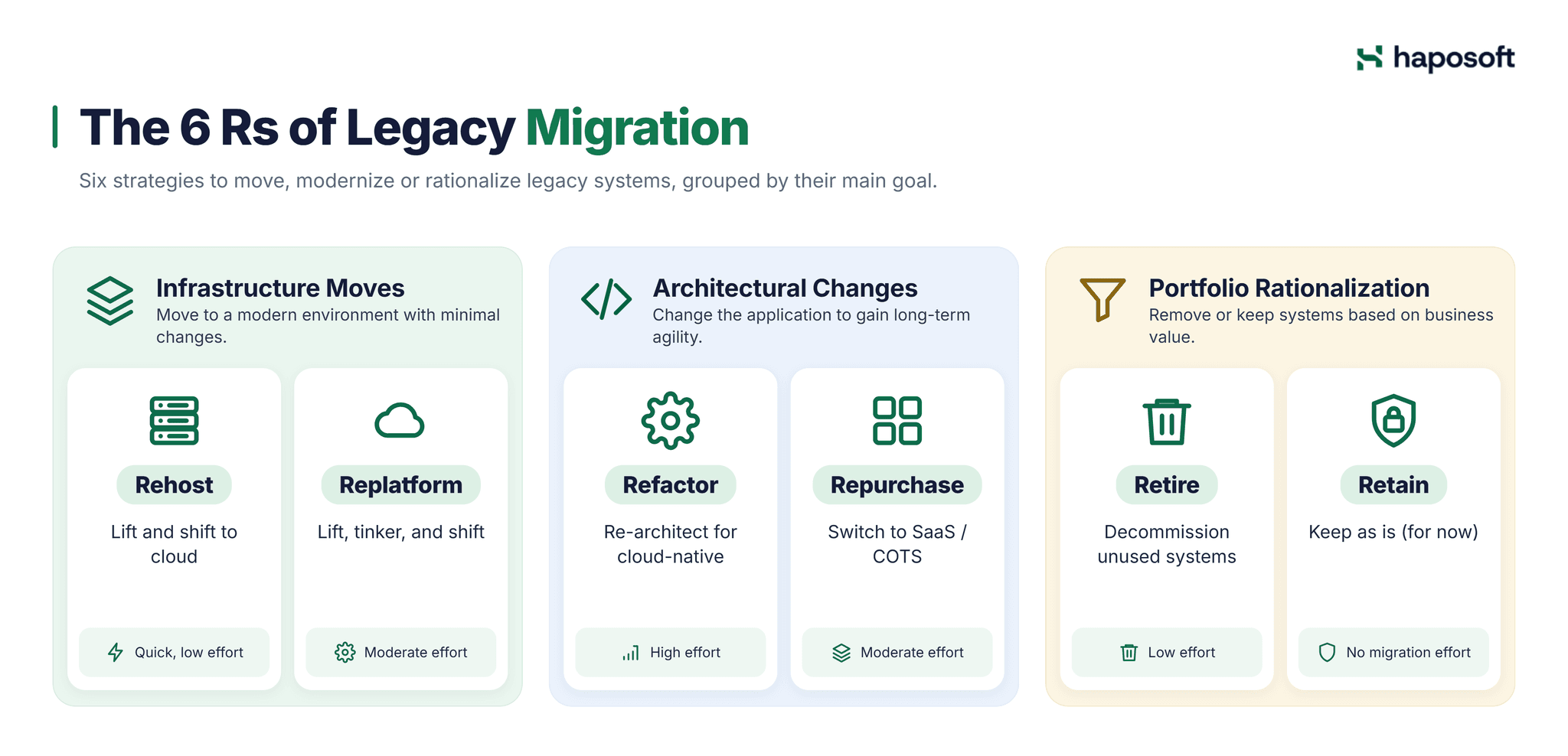
Choosing a migration path is rarely about one strategy. Most enterprise programs mix approaches based on each application's business value and technical complexity. The most widely used framework is the "6 Rs", popularized by AWS in 2016 as an extension of Gartner's earlier "5 Rs" model; AWS later added a seventh, Relocate.
Quick Comparison: The 6 Rs at a Glance
| Strategy | Core Action | Effort & Cost | Best For | Primary Risk |
|---|---|---|---|---|
| Rehost | Lift and shift to cloud | Low | Urgent data center exits | Carries over all technical debt |
| Replatform | Lift, tinker, and shift | Medium | Moving to managed services | Minor code changes might break dependencies |
| Refactor | Re-architect for cloud-native | High | Mission-critical, high-growth apps | High cost, long timeline, requires skilled DevOps |
| Repurchase | Switch to SaaS/COTS | Medium | Commodity functions (HR, CRM) | Data mapping and change management friction |
| Retire | Decommission | Low | Redundant or "zombie" systems | Accidental deletion of legally required data |
| Retain | Do nothing for now | None | Stable, low-value, or highly regulated apps | Accumulating security and maintenance debt |
1. Infrastructure Moves: Rehost and Replatform
Rehost (Lift and Shift) is the fastest way out of a legacy data center. You replicate the server images (OS, binaries, data) directly into a cloud environment using replication tools such as AWS Application Migration Service. It solves immediate hardware obsolescence but can leave you paying cloud costs for an application that was not designed for the cloud.
Replatform (Lift, Tinker, and Shift) adds targeted optimizations. You aren't rewriting the app, but you are swapping out legacy infrastructure for managed services. For example, moving a self-managed MySQL database to a managed service such as Amazon RDS for MySQL, or moving a legacy file server to S3. This reduces operational overhead (patching, backups) while keeping the core application logic intact.
2. Architectural Changes: Refactor and Repurchase
These strategies require significant changes to the codebase or business processes to unlock long-term agility.
Refactor (Re-architect) is the most complex path. It involves breaking down a monolithic legacy app into microservices or serverless functions. For large systems, teams often use the Strangler Fig Pattern—gradually routing specific functionalities to new microservices while the legacy system continues to run, eventually "strangling" the old code. It can deliver the greatest long-term benefit, but it demands a mature DevOps culture and distributed tracing tools.
Repurchase (Drop and Shop) means abandoning custom code for a SaaS solution (e.g., moving from a custom on-premise CRM to Salesforce). The hidden cost here isn't the software license; it's the data mapping and business process reengineering. Legacy systems often contain decades of company-specific business logic that doesn't fit neatly into a standard SaaS schema.
3. Portfolio Rationalization: Retire and Retain
Not every legacy system needs to be migrated. Sometimes the best technical decision is to stop investing in it.
Retire is the process of decommissioning "zombie systems"—apps that are still consuming compute resources but no longer serve active users. The critical step here is data archiving. You must extract and store data in a searchable, long-term format to meet legal and compliance retention policies before pulling the plug on the infrastructure.
Retain means keeping the system as it is, for now. This is valid for apps with specialized hardware dependencies, strict regulatory constraints or a planned replacement date. Retaining is still an active decision: if the system no longer receives vendor patches, the security team should add compensating controls such as network segmentation, enhanced monitoring and virtual patching, and review the decision on a fixed schedule.
Common Challenges and Mitigation Tactics
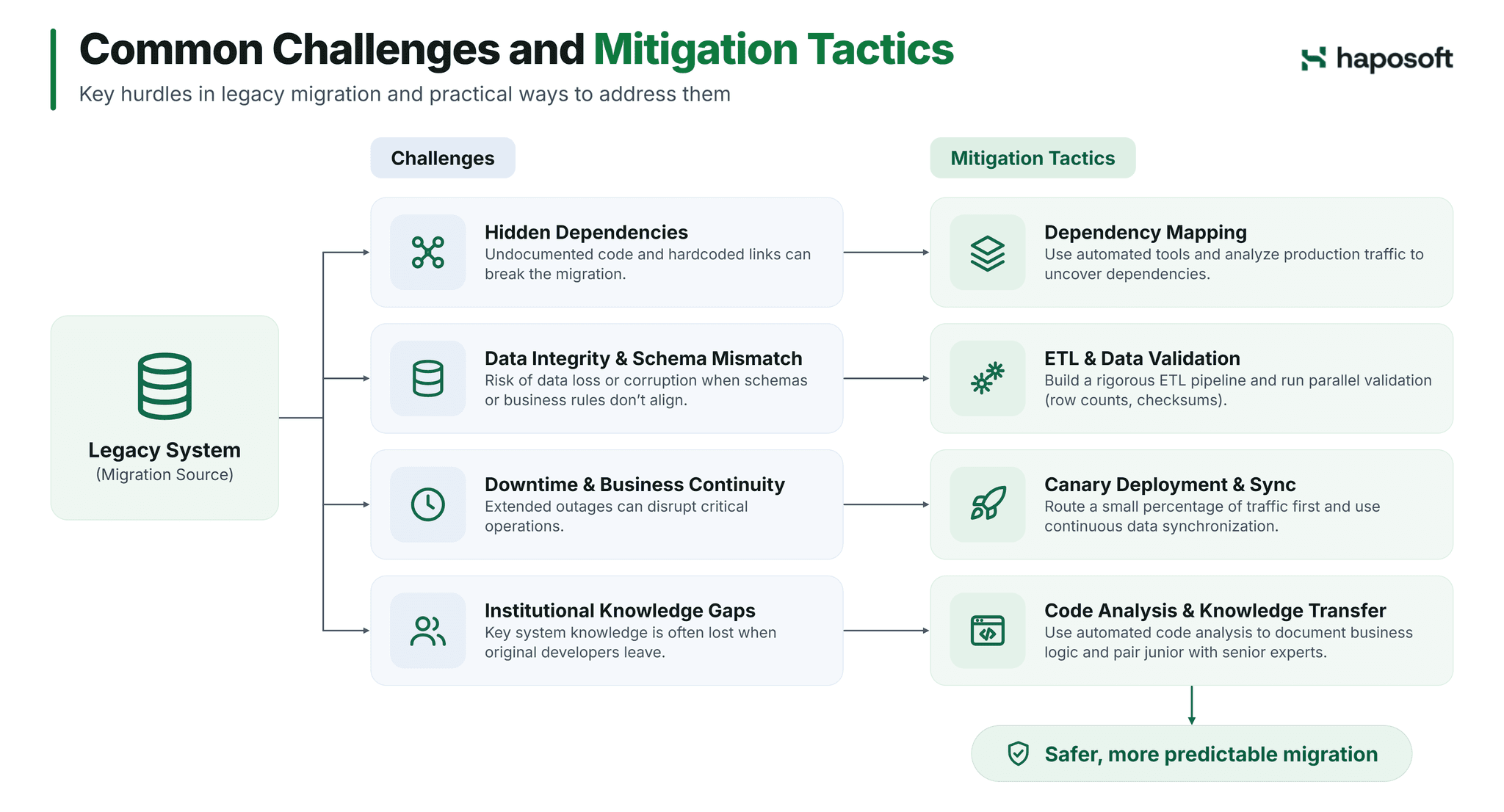
Legacy migration projects often run over budget and schedule when dependencies and data issues surface late. Anticipating these specific hurdles allows teams to implement effective countermeasures early.
Hidden Dependencies
Legacy systems are notorious for undocumented code and hardcoded IP addresses. To prevent breaking these hidden links, teams must use automated dependency mapping tools. Monitoring the legacy system's network traffic in production over a full business cycle, including month-end and batch jobs, reveals these invisible connections before the actual migration begins.
Data Integrity and Schema Mismatch
Moving data from a legacy database to a new schema risks data loss or corruption when field types, encodings or business rules do not map cleanly. The standard defense is a rigorous Extract, Transform, Load pipeline. Teams should run parallel data validation scripts to compare record counts and checksums between the old and new environments before executing the final cutover.
Downtime and Business Continuity
Extended outages during migration are unacceptable for critical business operations. Instead of a risky full cutover, engineers should adopt a canary deployment strategy. This involves routing a small percentage of live traffic to the new system first to validate stability under production load. When both systems share data, pair this with continuous data synchronization so the old and new environments stay consistent.
Institutional Knowledge Gaps
The original developers of a legacy system often leave the company, taking critical context with them. Relying on memory is a fatal flaw. Teams must invest in automated code analysis tools to document business logic and pair junior engineers with senior modernization architects to rebuild that institutional knowledge.
A Step-by-Step Legacy Migration Framework
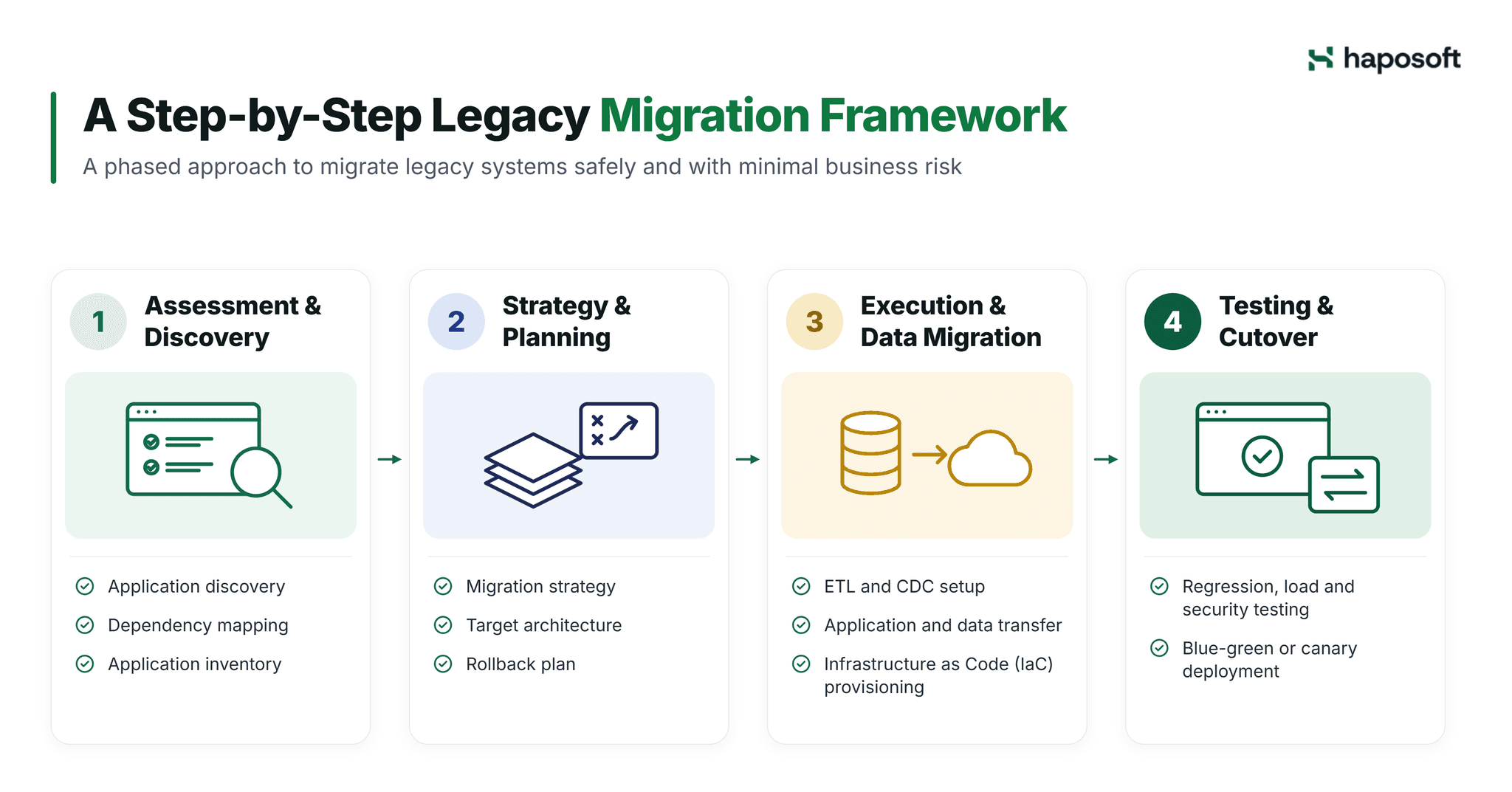
Executing a complex migration requires a disciplined, phased approach. Rushing the process inevitably leads to data loss, extended downtime, and broken dependencies.
Phase 1: Assessment and Discovery
The assessment phase begins with comprehensive application discovery. Engineering teams deploy Application Performance Monitoring (APM) tools and network traffic analyzers to map hidden dependencies, database links, and third-party integrations. This data forms a baseline inventory, allowing architects to categorize applications by business criticality and technical complexity before making any infrastructure changes.
Phase 2: Strategy and Planning
Strategy formulation relies heavily on the assessment data. Architects assign a specific migration path to each application and define the target cloud architecture. A critical component of this phase is designing the rollback mechanism. Teams must configure database snapshots and DNS failover protocols, ensuring the system can revert to the legacy system quickly if the new environment fails validation during the initial rollout.
Phase 3: Execution and Data Migration
Execution involves transferring both the application logic and the underlying data. Data engineers build automated Extract, Transform, Load pipelines, often utilizing Change Data Capture (CDC) to synchronize data between the legacy and new databases in real time. Infrastructure teams provision the target environment using Infrastructure as Code tools like Terraform, ensuring all resources are version-controlled and reproducible.
Phase 4: Testing and Cutover
The final phase focuses on rigorous validation and traffic transition. Teams execute automated regression suites, load testing, and security scans against the new environment. The actual cutover typically employs a blue-green or canary deployment strategy, routing a small percentage of live traffic to the new system first. Engineers monitor latency and error rates closely during this window before completing the full transition.
Where AI Fits in Legacy Migration
AI tools can speed up the slowest, most manual parts of a migration: reading undocumented code, documenting business rules, mapping dependencies, generating test cases and drafting code conversions (for example from older Java or COBOL). They work best as assistants to engineers, not replacements: every AI-generated change still needs code review and regression testing against the legacy system's behavior.
Legacy code often contains business rules that were never documented or have changed over time. Haposoft uses AI to reverse-engineer these rules into functional specifications, which engineers validate against the existing system before migration begins. The same spec-first principle underpins Haposoft's Spec-Driven Development approach and CafeKit.
FAQ: Common Questions About Legacy Migration
What are the biggest risks during a legacy migration?
The biggest risks are unplanned downtime, data loss or corruption, and breaking hidden dependencies between systems. Thorough discovery, automated testing and a tested rollback plan reduce all three.
How much does a legacy migration project cost?
Cost depends mainly on the strategy, the size and complexity of the system, the volume of data and how much business logic must be rebuilt. A rehost of a few servers usually costs far less than refactoring a core monolith, which is driven by months of engineering work. A short assessment of the current system is the most reliable way to get a realistic estimate.
What is the difference between legacy migration and modernization?
Migration moves a system to a new environment; the code may stay largely the same. Modernization changes the system itself, by refactoring or rebuilding it to use modern architecture and cloud services. Many projects combine both: migrate first, then modernize step by step.
How do you handle legacy data migration to the cloud?
Teams typically use ETL pipelines combined with change data capture (CDC) to keep old and new databases in sync during the transition. Validation scripts that compare row counts and checksums confirm data parity before the final cutover.
What tools are commonly used for legacy migration?
Common choices include application discovery tools such as CAST Imaging, infrastructure as code tools such as Terraform, and data migration services such as AWS Database Migration Service or Azure Database Migration Service. The right stack depends on the source and target environments.
Conclusion
Legacy migration is a complex technical necessity rather than a simple IT project. It demands accurate assessment, careful data handling, and realistic timelines to avoid disrupting core business operations.
Need to modernize core systems but lack the internal bandwidth to map dependencies or build safe data pipelines? Haposoft assesses your current infrastructure, designs the target architecture, and executes the transition using AI-assisted code analysis to document business logic, with strict data integrity controls. Explore Haposoft's AI Legacy Migration services.