AI legacy migration means using AI to read, document, test and help convert old enterprise systems so they can move to a modern platform with far less manual analysis. It is most useful when the hardest part of your migration is understanding what the old system actually does. Engineers still review and approve every change before it reaches production.
If you run a core system that is 15 or 20 years old, the real question is which parts of the project AI can shorten, how much risk it can take out, and which controls you need around it. The sections below answer each of those, with sources you can check.
What Is AI Legacy Migration?
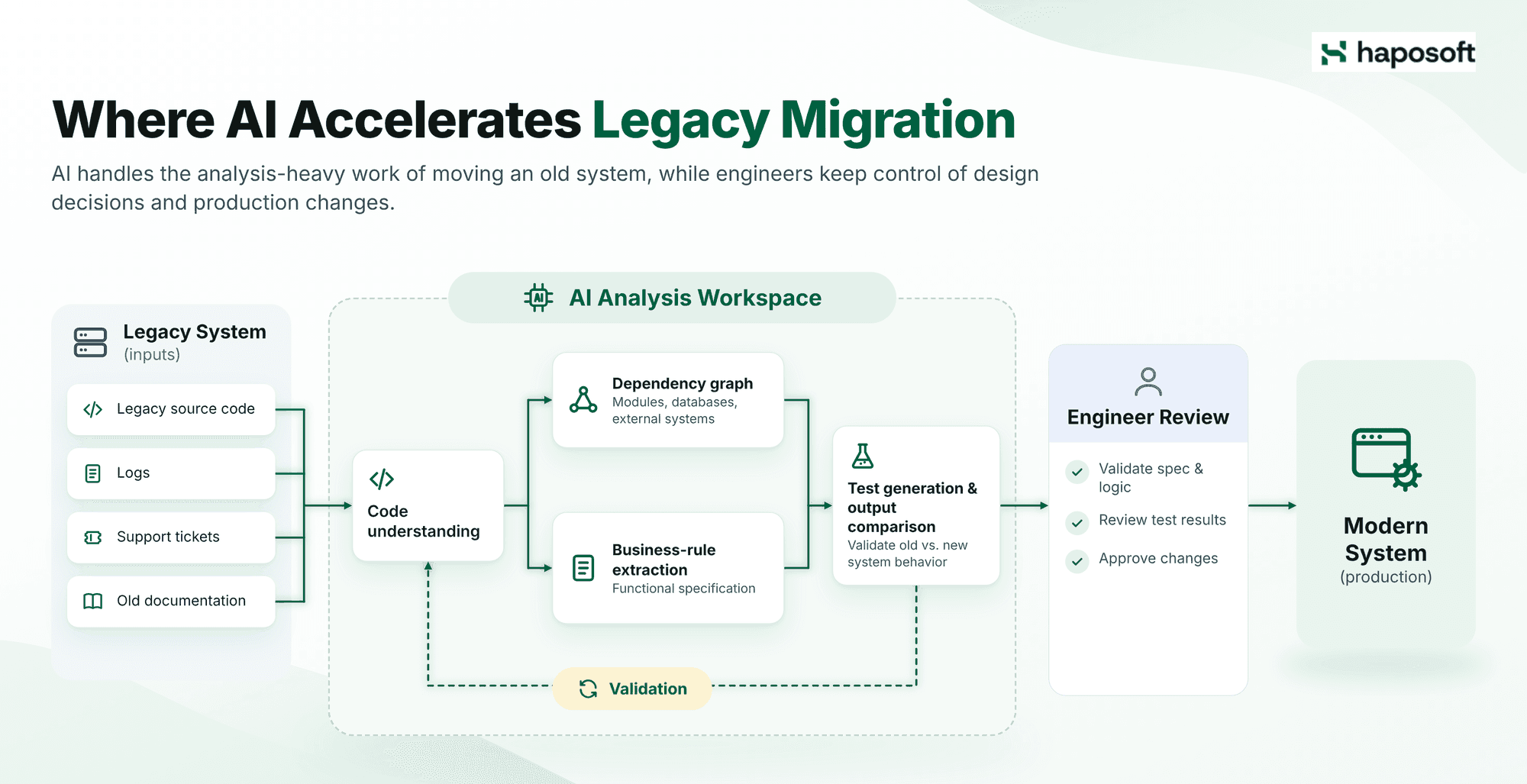
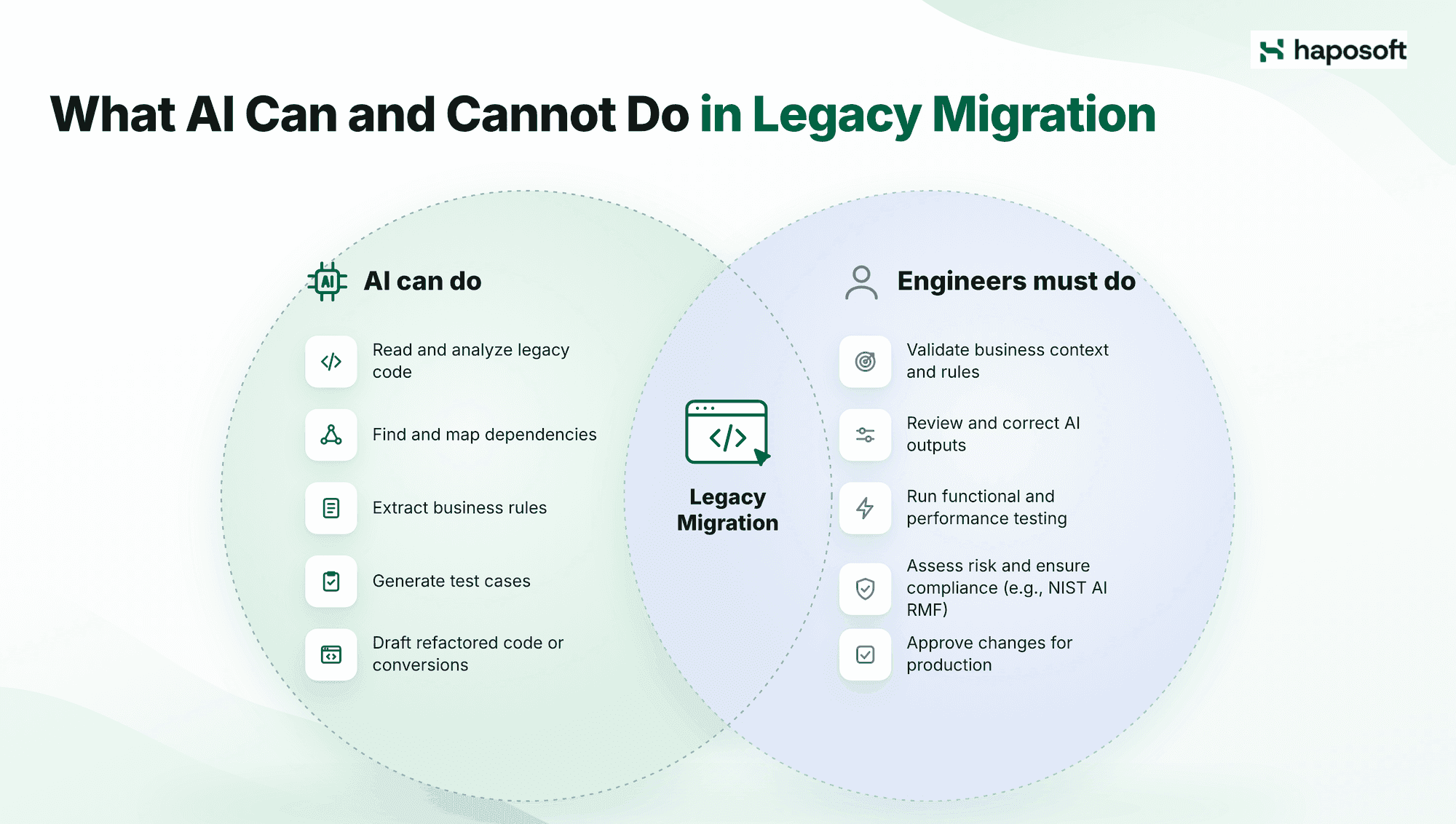
AI legacy migration is a migration approach in which AI tools handle the analysis-heavy work of moving an old system, while engineers keep control of design decisions and production changes. In a typical project, AI is used to:
- read legacy source code and explain what each module does
- map dependencies between modules, databases and external systems
- turn business rules buried in code into readable specifications
- draft refactored code or conversions to a newer language or framework
- generate test cases and compare outputs between the old and new system
The gains can be large on well-defined tasks. Amazon reported that its AI assistant cut a typical Java 17 upgrade from about 50 developer days to a few hours, saving an estimated 4,500 developer-years across its internal applications (Andy Jassy post). Those are Amazon's own figures for a fairly standard upgrade. A heavily customized ERP or core banking system will see smaller and less predictable gains.
If you want the foundational concepts first, read our breakdown on What is legacy migration?
Why Delaying Legacy Migration Gets More Expensive
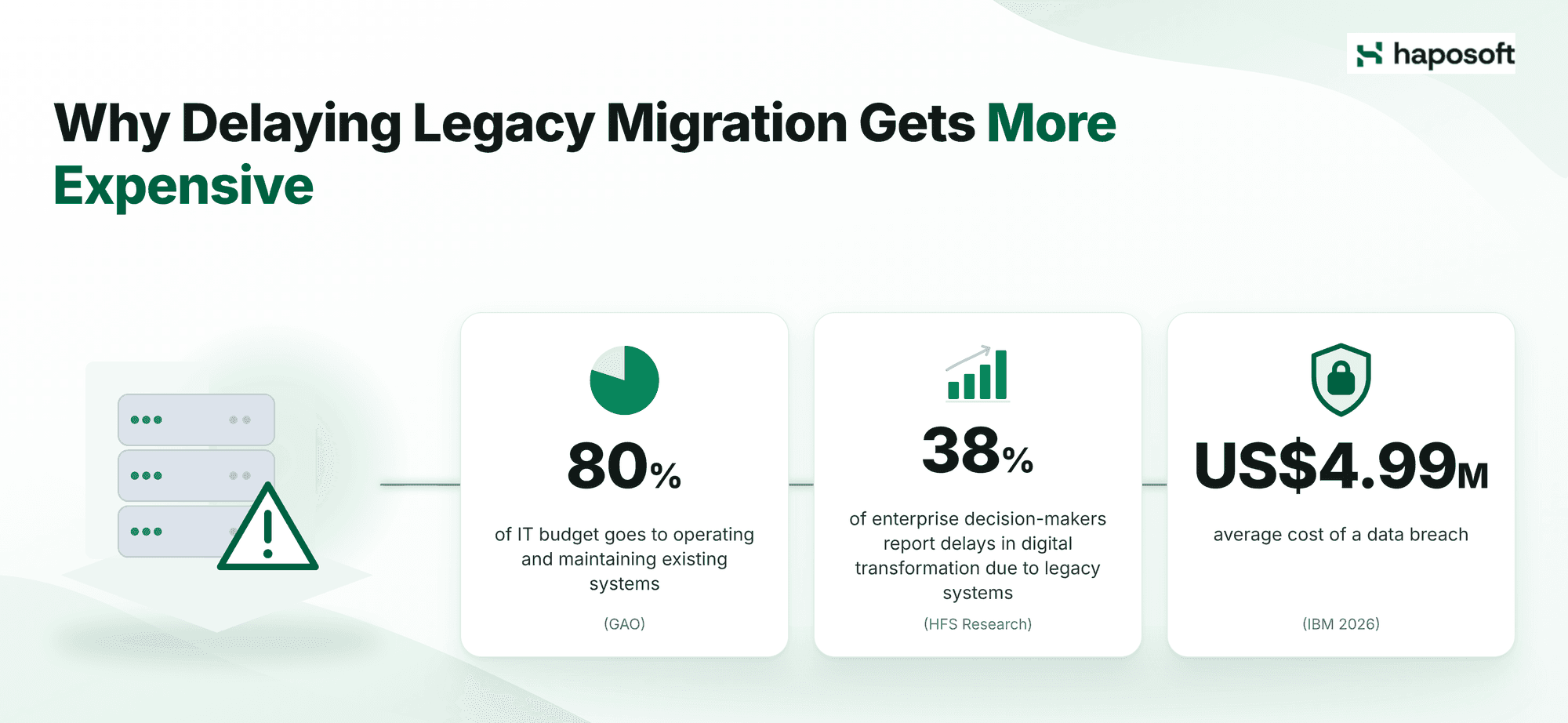
Delaying a legacy migration rarely saves money, because maintenance cost, delivery speed and security exposure all get worse each year the system stays as it is. Large, well-funded organizations face the same problem. In a July 2025 report, the U.S. Government Accountability Office reviewed critical federal systems that are 23 to 60 years old and noted that agencies typically spend about 80% of their IT budget on operating and maintaining existing systems (GAO-25-107795).
Maintenance costs keep rising
Legacy maintenance gets more expensive because the people who can safely change the system become harder to find. Documentation is usually incomplete, so each change starts with days of investigation. Most of the cost sits in troubleshooting, repeat defects and onboarding new engineers rather than in hosting or licenses. When a senior engineer retires, part of the system's knowledge leaves with them.
The business waits on IT
Legacy systems block every initiative that touches them. Launching a new sales channel, connecting a partner API, or automating a finance report can stall for weeks. IT needs time to figure out what the change might break. In a 2025 HFS Research survey: 38% of enterprise decision-makers surveyed by HFS Research in 2025 reported delays in digital transformation caused by legacy systems. For executives, these delays mean missed revenue and slower response to competitors.
Security and compliance gaps widen
Systems that are out of vendor support stop receiving security patches. Many also lack central logging and can't connect to modern identity and access management. This makes audits harder for any company that handles customer data, payments, or health records. If you bring AI into the fix, govern it with a recognized standard such as the NIST AI Risk Management Framework so the new tools don't open new compliance gaps.
Where AI Saves the Most Time in AI Legacy Migration
AI saves the most time before and after the code changes: understanding the old system at the start, and proving the new system behaves the same at the end. These two phases are where most migration budgets overrun.
Discovery and dependency mapping
AI analyzes source code, logs, support tickets, and old documents to build a map of how the system fits together. For a system running for over a decade without current architecture diagrams, this replaces weeks of interviews with long-serving staff. On an undocumented system, manual dependency discovery can take weeks to collect and consolidate data, often leaving gaps or errors. AI produces a first-draft dependency map far sooner, so architects spend their time validating the map instead of building it. Architects still check the map against production traffic before anyone decides a component can be switched off. AI-generated maps can miss implicit dependencies in configuration files or external scripts.
Turning business rules into specifications
In many legacy systems, pricing logic, approval rules and customer exceptions exist only in the code. AI can scan the codebase and describe these rules in plain language for business owners to confirm.
Haposoft applies this as the mandatory first step in every AI-assisted migration. AI reverse-engineers the rules into a functional specification, our engineers validate that specification against how the current system behaves, and the new system is built from the approved version. The same spec-first idea is behind our Spec-Driven Development approach and CafeKit.
Comparing migration options
With assessment data in hand, AI can prepare a first comparison of options for each application, based on common migration strategies such as rehost, relocate, replatform, refactor, repurchase, retire, and retain (AWS: the 7 Rs). An architect makes the final call. The time saved matters most when a portfolio has hundreds of applications needing a recommendation.
Testing and regression checks
AI generates test cases from legacy code, requirements, and historical behavior. It also creates synthetic test data for edge cases. This is highly useful in parallel runs, where the same transactions go through both the old and new system to compare outputs.
Manual tests often cover the expected user flows but miss less common cases. AI can help create tests for edge cases and bugs found in the past. It can also compare source and target schemas to flag data that does not match. Running these checks before cutover helps catch problems earlier, but it does not guarantee a trouble-free go-live. Some business logic errors may still go unnoticed unless someone familiar with the system reviews them.
Where AI Falls Short in AI Legacy Migration
Before committing budget, leadership needs to know where AI cannot help. These are the gaps that require human expertise, and ignoring them is a common reason AI-assisted migrations go wrong. AI is weakest where a migration depends on knowledge that was never written into the code or the documents. Plan for these limits before you set expectations with the board:
- Missing context. Manual workarounds, month-end procedures, seasonal or regulatory exceptions, and informal agreements with business teams don't appear in the code, so AI can't find them. You still need interviews with the people who run the process.
- Confident mistakes. AI can report a dependency that doesn't exist, miss one that does, or describe pricing and approval rules that sound plausible but don't match how the system actually behaves. Every map and extracted rule needs checking against real transaction data.
- Code that runs but behaves differently. Converted code can compile and pass basic tests while handling rounding, dates, or error cases differently from the original. Parallel runs catch most of these issues.
- Performance characteristics. AI cannot predict how the new system will perform under production load, handle concurrent transactions, or respond to peak traffic patterns. Performance testing remains a manual, infrastructure-dependent activity.
- Data exposure. Sending source code or customer data to an external AI service without a security review can create a bigger risk than the legacy system itself.
AI Legacy Migration vs Manual Migration
AI-assisted migration differs from traditional manual migration mainly in how fast the team can analyze, document, and test the old system. The core difference is the speed and depth of analysis, not the removal of human oversight.
| Area | Manual migration | AI-assisted migration | Business impact |
|---|---|---|---|
| Discovery | Workshops, interviews, manual code review | AI analysis of code, logs, tickets and documents | Faster baseline, fewer blind spots |
| Documentation | Often outdated or incomplete | AI-drafted summaries reviewed by engineers | Better knowledge transfer |
| Business rule extraction | Depends on a few senior engineers | AI surfaces hidden logic for business owners to confirm | Lower risk of losing critical rules |
| Testing | Manual test design, limited coverage | AI suggests test cases and edge scenarios | Better regression readiness |
| Data mapping | Spreadsheet-heavy and error-prone | AI-assisted schema comparison and anomaly detection | Lower data quality risk |
| Project governance | Status updates from separate teams | AI summarizes progress, blockers and risks | Clearer executive visibility |
When to choose AI-assisted migration: it fits best when the system is large, poorly documented and full of business rules, and when your team has the skills to review AI output. A small, well-documented application can often be migrated just as quickly by hand. If your organization has no policy yet on which code and data may be shared with AI tools, set that policy before starting.
Where the ROI of AI Legacy Migration Comes From
The return on AI legacy migration comes from three sources: fewer engineering hours spent on analysis, fewer defects after cutover, and faster decisions about which systems to fund.
- Cost. Discovery, documentation and test preparation take much less manual effort. Track assessment time, hours spent reverse-engineering code and the amount of rework.
- Risk. A single serious migration defect can stop billing, delay payroll or corrupt management reports. Catching edge cases earlier lowers that risk, provided rollback plans and parallel runs are in place.
- Decision speed. Many modernization programs stall because leaders lack clear data on each system. AI-generated assessments show which systems are high-risk, which are low-value and which are ready to modernize.
Warning: Measuring only productivity gains while ignoring quality metrics creates false ROI. If AI speeds up discovery but introduces more defects, the net result is negative. Track both sides.
Use the table below to set up measurement. The example metrics are illustrative targets, not guaranteed results.
| ROI lever | What to measure | Example metric |
|---|---|---|
| Engineering productivity | Hours spent on analysis and documentation | Fewer discovery hours compared with baseline |
| Migration quality | Defects found before production | Higher pre-cutover defect detection |
| Delivery speed | Time from assessment to pilot | Shorter planning cycle |
| Operational risk | Downtime and rollback incidents | Fewer failed releases |
| Knowledge retention | Documentation completeness | More systems with reviewed runbooks |
Baseline requirement: You must measure these metrics before the pilot starts. Without a baseline, you cannot prove ROI after the fact. Teams that skip this step often struggle to justify scaling the program.
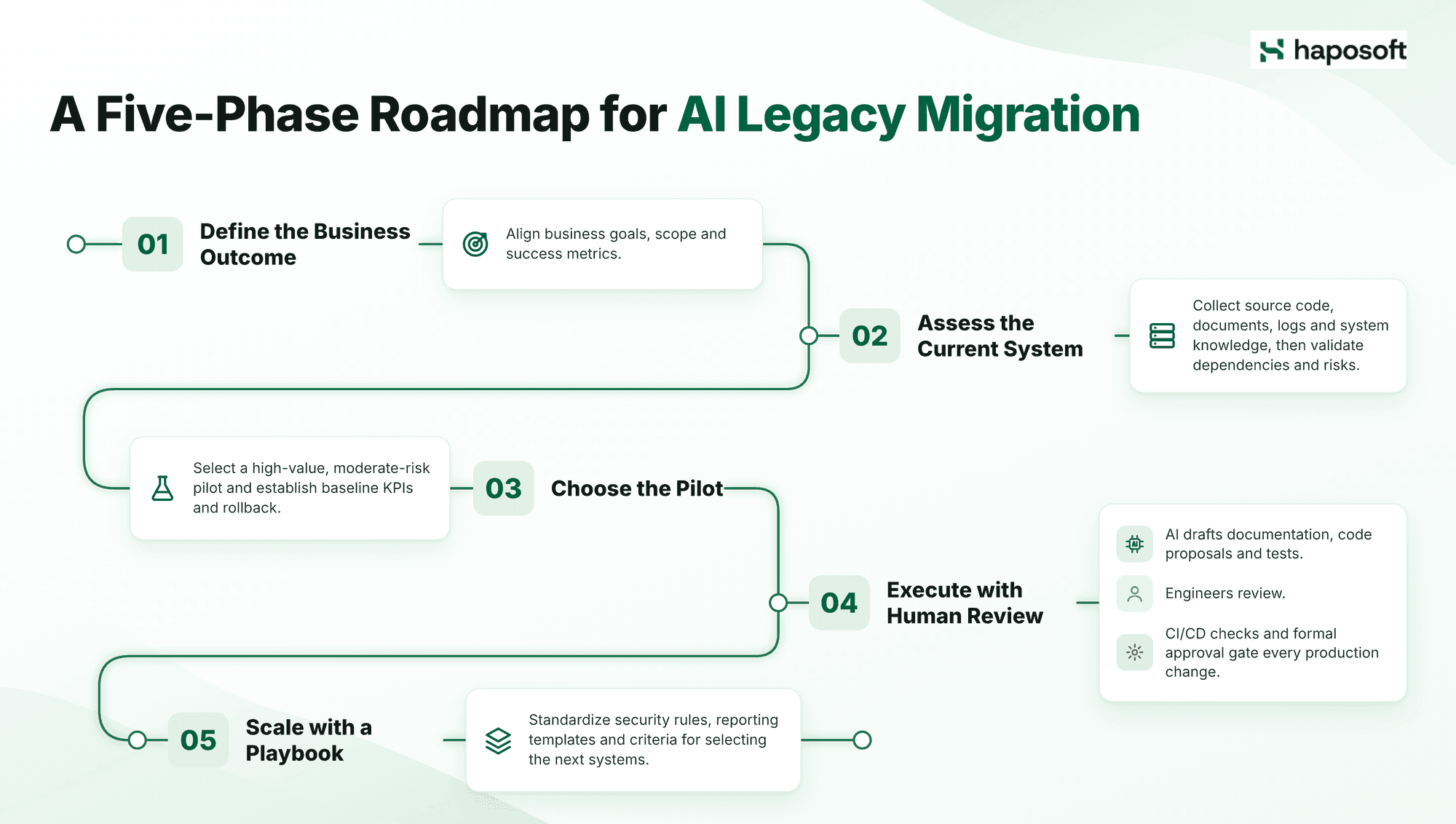
A Five-Phase Roadmap for AI Legacy Migration
A safe AI legacy migration moves through five phases, from a clear business goal to a repeatable playbook. Skipping the first two phases is a frequent reason pilots fail to scale.
Phase 1: Define the business outcome
Start with a specific goal, such as replacing an unsupported core platform, shortening the financial close or preparing a system for new API integrations. A clear goal makes it much easier to choose the first pilot and to judge whether it worked. Do not start with "we need to use AI." Start with a business problem. If the goal is vague, the pilot will be vague, and you will not be able to measure success.
Outputs: Approved business case, scope, success metrics, and documented risk appetite.
Phase 2: Assess the current system
Collect source code, logs, architecture diagrams, runbooks, and dependency data. AI helps organize and classify this material, and a senior architect reviews the result. Most failed migrations trace back to a misunderstanding of the original system, so this phase deserves the most care. AI-generated assessments are starting points, not final answers.
Outputs: Application inventory, validated dependency map, risk scores and a shortlist of candidates.
Phase 3: Choose the pilot
Pick a system with clear business value and moderate risk. The easiest system proves little, and the most critical one puts revenue at stake if something goes wrong. Do not pick the pilot based on which system the team likes most. Pick based on measurable business impact and manageable operational risk.
Outputs: Pilot charter, baseline KPIs, rollback plan, and approval workflow.
Phase 4: Execute with human review
AI drafts documentation, refactoring proposals, test cases and data checks. Every production change still passes peer review, automated CI/CD checks and a formal approval gate. If your team cannot validate AI-generated code changes, stop the pilot immediately. Do not push unvalidated changes to production.
Outputs: Reviewed code changes, test evidence, data validation reports, and a signed release checklist.
Phase 5: Scale with a playbook
Turn the pilot into a standard playbook with shared security rules, reporting templates and criteria for picking the next systems. Without this step, every new department repeats the same setup work. Document what worked, what failed, and what governance controls are non-negotiable.
Outputs: Migration playbook, governance model and internal training plan.
Security and Governance Controls
Three controls matter most when AI is part of a migration: deciding where your code and data may go, keeping a named person accountable for every change, and following recognized frameworks.
Decide where AI runs
Choose the environment before the pilot starts: a public model, a private instance, an enterprise API, or an air-gapped setup. Source code, customer records, and runbooks should only go to an AI service that has passed a security review and is covered by a data processing agreement. Pilots that skip this step often stall later when legal and security teams review them.
Keep a named approver for every change
Changes to business logic, database schemas, migration scripts or production systems need a documented sign-off from a responsible engineer or manager. Accountability for an incident should always sit with a person, never with "the AI suggested it." Audit logs should show who approved each deployment, and AI-generated changes should never approve themselves.
Follow recognized frameworks
The NIST AI Risk Management Framework covers the wider risks of using AI in a modernization program. The OWASP Top 10 for LLM Applications lists specific threats engineers should guard against, including prompt injection, sensitive information disclosure and improper output handling. If AI agents will act on systems directly, the 2026 guidance Careful Adoption of Agentic AI Services from the NSA, CISA and partner agencies recommends giving agents only the access each task needs and requiring human approval for high-impact actions.
Which Industries Benefit Most from AI Legacy Migration
AI legacy migration delivers the most value in industries that run long-lived, heavily customized core systems.
Financial services
Core banking and ledger systems are often decades old, heavily audited, and full of sensitive data. AI helps decode business rules, build test suites, and prepare audit documentation, while any change to transaction logic stays under strict human control. Once reviewed, AI-drafted documentation also gives auditors a clearer record of what changed and why.
Manufacturing and logistics
ERP, warehouse, and maintenance systems are usually customized over many years. AI helps map the links between them so the migration can happen in stages. This matters when downtime can stop a production line. AI-generated test data lets the team rehearse the cutover against realistic production scenarios before touching the live environment.
Retail and customer operations
Loyalty, order, support, and CRM systems often hold overlapping data that doesn't match. AI helps trace how data flows between them before they are consolidated onto one platform. This prevents the loss of customer purchase history or loyalty status during the transition.
Build, Buy or Partner?
Build in-house only if you already have a strong platform engineering team, proven legacy modernization experience, established AI governance, and spare capacity. Otherwise, partnering is usually faster and carries lower risk. When evaluating partners, look for a proven assessment method, clear risk management protocols, and a concrete plan to transfer knowledge to your internal team by the end of the project.
Use this checklist to decide your path:
| Question | If yes | If no |
|---|---|---|
| Do we understand our legacy dependencies clearly? | Start with an internal assessment | Bring in discovery support |
| Do we already have AI security policies? | Pilot within existing governance | Build governance before tooling |
| Can our team validate AI-generated changes? | Use AI as an engineering accelerator | Avoid production changes |
| Do we have a measurable business use case? | Proceed to a pilot | Reframe the initiative |
| Can we support the new platform after migration? | Plan a phased rollout | Include operating model design |
Conclusion
AI legacy migration shortens the slowest parts of modernization: understanding the old system, capturing its business rules and testing the new platform. It works best on large, poorly documented systems, with engineers reviewing every output and clear rules on where code and data may go. Companies that start with one well-chosen pilot, measure results against a baseline and then standardize the approach get the most value from it.
Book an AI Legacy Migration Assessment
The quickest way to judge whether AI fits your system is to test it on a small, sanitized sample of your own code.
In a Haposoft demo, we show AI extracting business rules, flagging dependencies, and producing migration documents your engineers can actually review. This gives you a realistic view of where AI saves effort and where human judgment remains mandatory.
After the demo, we can run a focused technical assessment, help you choose a pilot candidate, and set up the governance model around it. The goal is not to sell a full rewrite before the evidence is clear. The goal is to identify a migration path your technical team can defend and your leadership team can fund.
Learn more about our AI Legacy Migration services or contact Haposoft to book a demo.
FAQ
What is AI legacy migration?
AI legacy migration is the use of AI to assess, document, test and help convert outdated systems during a move to a modern platform. Engineers review every output, and all production decisions go through normal governance.
Can AI fully migrate a legacy system without developers?
No. AI can analyze code, suggest changes, write documentation and create tests, but developers are needed to confirm business rules, protect data integrity and keep production running.
Is AI legacy migration safe for enterprise data?
Yes, if you control which AI service is used, who can access it and what data it receives, and keep audit trails. Sensitive code or customer data should only go to AI tools that have passed a security review and are covered by a data processing agreement.
How is AI legacy migration different from traditional migration?
Traditional migration relies on senior staff to analyze and reverse-engineer the old system by hand. AI-assisted migration automates much of that discovery, documentation and testing work, while human review and approval stay the same.
How do companies measure ROI from AI legacy migration?
Companies measure discovery effort, migration defects, delivery speed, maintenance cost and documentation coverage. Each metric needs a baseline measured before the pilot starts.
Do we need to replace our legacy system completely?
Not always. Depending on the system, the right choice may be to rehost, relocate, replatform, refactor, repurchase, retire or retain it. Many companies modernize critical components in stages instead of replacing everything at once.
When should we avoid using AI in legacy migration?
Avoid it when your team cannot validate AI output, when data privacy rules are unclear, or when the system has no reliable rollback plan. AI should never be used as a shortcut around governance.