


AI coding assistants promise unprecedented speed, but they frequently deliver spaghetti code that often disregards your project's actual architecture. This happens because models operate on isolated prompts, lacking a structured workflow to maintain context across complex codebases.
CafeKit, developed by Haposoft, is a lightweight runtime for Claude Code that brings structure and accountability to AI-assisted software development. Instead of relying on long prompts and manual oversight, it guides AI through a spec-driven workflow where requirements, code, tests, and documentation stay synchronized from start to finish. The result is a more reliable development process with less context switching, fewer missed requirements, and higher confidence in every release.
What is CafeKit? The Engine Behind Spec-driven Development
CafeKit is a lightweight runtime developed by Haposoft that brings Spec-Driven Development (SDD) to Claude Code. Installed directly into your project's `.claude` directory, it adds a structured workflow on top of Claude's coding capabilities, helping teams move from requirements to production-ready code without losing context along the way.
To understand why CafeKit matters, it's worth looking at how most AI-assisted development works today. Developers often start with a prompt, generate some code, make a few adjustments, and move on to the next task. The feature may work, but requirements get buried in chat history, documentation falls out of date, and nobody is completely sure whether the final implementation still matches the original intent.
Spec-Driven Development solves this problem by making the specification the starting point of every feature. Before any code is written, requirements, expected behavior, edge cases, and success criteria are documented and approved. Development then follows that specification step by step, ensuring that implementation, testing, and documentation remain aligned throughout the entire process.
Read more: What is Spec-Driven Development? Unraveling the new software development method of the AI era
CafeKit is the tooling layer that turns this philosophy into a practical workflow for AI. Rather than relying on Claude to remember dozens of prompts and project rules, it provides a set of commands, agents, and automated checks that guide every stage of development. A feature request becomes a requirements document, the requirements become a technical design, and the design is broken down into verifiable tasks before implementation even begins.
This structure becomes especially valuable on larger projects where AI-generated changes span multiple files, services, or teams. By enforcing quality gates and keeping specifications synchronized with the codebase, CafeKit helps prevent the "fake progress" that often appears in AI-assisted development-when a task looks complete on the surface but introduces regressions, breaks existing functionality, or quietly drifts away from the original requirements.
How CafeKit Automates AI Discipline (Enforcing the SDD Contract)
AI-generated code is no longer the hard part. The real challenge is ensuring that code remains aligned with requirements, design decisions, and project standards as development progresses. This is where Spec-Driven Development (SDD) becomes valuable-and where CafeKit provides the structure needed to make it work in practice.
Why Do AI Coding Workflows Break Down?
Most AI coding tools are designed to generate output as quickly as possible. While this can accelerate development, it also introduces a familiar problem: context gradually gets lost. Requirements live in chat history, design decisions become scattered across conversations, and documentation often falls behind the implementation.
This is why many teams experience "spec drift" when working with AI. A feature may start with a clear goal, but after multiple prompts, revisions, and follow-up requests, it becomes difficult to verify whether the final result still matches the original intent. The larger the project becomes, the more difficult this problem is to manage.
Spec-Driven Development takes a different approach by making the specification the source of truth. Instead of relying on prompt history, every requirement, design decision, task, and validation step is tied back to an approved specification.
|
Vibe Coding |
Spec-Driven Development |
|
Starts with prompts |
Starts with approved specifications |
|
Context lives in chat history |
Context lives in project artifacts |
|
Fast for small experiments |
Scales better for complex projects |
|
Documentation is often updated later |
Documentation evolves alongside development |
|
Difficult to audit decisions |
Every change can be traced back to requirements |
How Does CafeKit Keep AI on Track?
CafeKit operationalizes this process inside Claude Code. Once installed in your project's `.claude` directory, it introduces a set of specialized agents and workflow rules that help ensure work remains aligned with the approved specification.
Rather than relying on developers to manually check every step, CafeKit delegates specific responsibilities to a set of purpose-built agents throughout the workflow. Three of the most important for keeping work aligned are:
Tester Agent (test-runner)
Validates implementations against predefined test commands, acceptance criteria, and expected behavior.
Reviewer Agent (code-auditor)
Checks whether completed work satisfies the approved specification and follows project standards.
Doc-Sync Agent (docs-keeper)
Keeps documentation, project records, and specifications synchronized as development progresses.
Because these checks are built into the workflow itself, developers spend less time repeating context, verifying assumptions, or chasing outdated documentation. While Cafekit’s agents and automated checks reinforce the process around it.
What Happens Before Code Can Move Forward?
AI-generated code often looks finished long before it's actually ready to ship. A feature might appear to work during a quick review, but still miss edge cases, fail integration tests, or leave documentation out of date. As teams rely more heavily on AI, these small gaps can accumulate into larger maintenance problems.
CafeKit addresses this by treating code generation as only one step in the workflow. Before a task can be completed, the implementation must satisfy the approved specification and pass the required validation checks. Documentation updates can also be enforced as part of the process, helping teams keep project knowledge aligned with the codebase rather than updating it weeks later.
The goal isn't to add more process for the sake of process. It's to create a workflow where progress is measured by verified outcomes instead of generated output. That gives teams more confidence in what the AI produces and reduces the amount of manual verification needed before work moves forward.
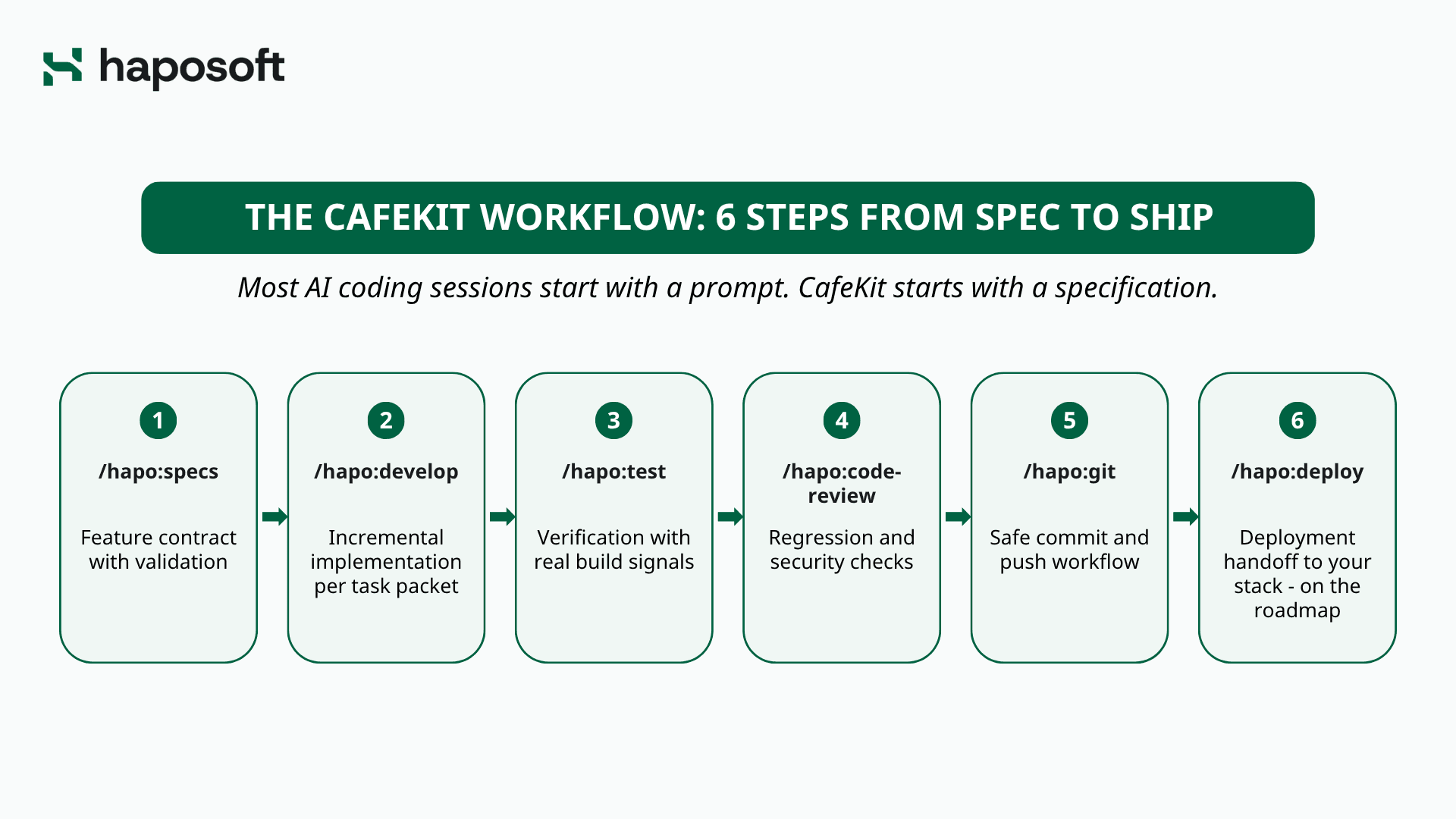
The CafeKit Workflow: 6 Steps from Spec to Ship
Most AI coding sessions start with a prompt. CafeKit starts with a specification.
Instead of asking Claude to improvise/guess an entire feature, CafeKit forces a structured sequence. Every stage produces a verifiable artifact, ensuring context isn't lost as the codebase scales. Steps 1–5 are available today. Step 6 (/hapo:deploy) is on the roadmap. For now, deployment is handled through the /hapo:devops skill. Note that /hapo:develop already runs an internal quality gate—test, spec review, and code review with self-healing—after every task, so Steps 3 and 4 are explicit, broader verification passes rather than the only place QA happens.
|
Stage |
Commands |
What You Get |
|
Spec |
/hapo:specs |
Feature contract with validation |
|
Develop |
/hapo:develop |
Incremental implementation per task packet |
|
Test |
/hapo:test |
Verification with real build signals |
|
Review |
/hapo:code-review |
Regression and security checks |
|
Git |
/hapo:git |
Safe commit and push workflow |
|
Deploy |
/hapo:deploy |
Deployment handoff to your stack - on the roadmap |
Step 1: Create the Feature Contract with /hapo:specs
This is where vague product ideas transform into strict engineering contracts. The command captures your feature request and generates a structured spec workspace—requirements, research, design, and verifiable task files—with explicit scope, behaviors, constraints, and success criteria. You then validate the spec using /hapo:specs validate, which ensures the requirements are complete and implementation-ready. The task registry tracks the validation status, and the AI cannot proceed until the spec passes all checks.
Step 2: Implement One Task Packet at a Time with /hapo:develop
During the spec stage, CafeKit already broke the approved spec into atomic, independently testable task packets. Each packet has a single objective, explicit completion criteria, and predefined verification commands. When you run /hapo:develop with a specific task packet, Claude implements exactly that piece of work-nothing more, nothing less. This prevents the AI from losing track as the context window fills up, eliminates scope creep, and keeps the AI from drifting from the approved design.
Step 3: Verify with Real Build and Runtime Signals /spec-test
Implementation is not complete until it passes automated quality gates. Running /hapo:test executes the exact verification commands defined in the task packet, checking against real build outputs and runtime behavior. What happens if a test fails? The workflow halts immediately. The AI must fix its own mistakes and re-run the tests before progressing. This completely eradicates "fake progress" where looks complete on paper (in the task checklist) but actually breaks the build.
Step 4: /hapo:code-review - Review for Regressions and Security
Before any code touches your main branch, CafeKit enforces a structured review process. The /hapo:code-review --pending command triggers specialist agents that scan for regressions, security vulnerabilities, and architectural inconsistencies. These agents cross-check the implementation against the original spec to ensure minimize deviation. Only when the review verdict is positive does the work qualify for the next stage
Step 5: /hapo:git - Commit and Push Safely
With all quality gates passed, the /hapo:git commit command prepares a clean, verified commit. Any documentation updated earlier in the workflow is committed alongside the code. The runtime ensures your spec registry and task state are synchronized with the actual implementation. Then /hapo:git push safely transfers the work to your remote repository. Every commit is traceable back to an approved spec and verified task packet.
Step 6: hapo:deploy - Ship with a Deployment Handoff
The final stage will hand off the verified release candidate to your existing deployment stack. Whether you use Vercel, AWS, or custom CI/CD pipelines, /hapo:deploy ensures the deployment process receives only code that has passed every checkpoint. Your documentation, spec registry, and production codebase remain stay aligned.
Getting Started with CafeKit
One of CafeKit's biggest advantages is how easy it is to introduce into an existing development workflow. There's no need to migrate frameworks, replace tools, or overhaul your tech stack. CafeKit works alongside Claude Code, adding the structure needed for Spec-Driven Development without disrupting how your team already builds software.
Install CafeKit
To install the runtime, simply navigate to your project's root directory and execute:
npx @haposoft/cafekit
That is it. This single command provisions your .claude directory with the necessary slash commands, workflow templates, and operational rules. For a deeper dive into advanced configurations, custom hooks, and edge-case handling, follow the official From Zero to CafeKit guide.
Once installed, you immediately trigger the spec-to-ship lifecycle:
/hapo:specs → /hapo:develop → /hapo:test → /hapo:code-review → /hapo:git → /hapo:deploy
Get Support
Because CafeKit is entirely stack-agnostic, it supports everything from Node.js and Python to Ruby on Rails and modern frontend frameworks. Teams can adopt the workflow incrementally on isolated legacy modules or greenfield projects alike. If your engineering org is evaluating SDD at scale and needs hands-on implementation guidance, direct support is available. You can request a technical walkthrough through the CafeKit contact form or connect directly through our email sale@haposoft.com to discuss your specific architecture.
Conclusion: Build with Confidence, Not Hope
The primary bottleneck in modern AI coding is no longer generation speed. It is context retention and architectural integrity. Unstructured prompting inevitably leads to fragmented logic, hallucinated dependencies, and mounting technical debt that senior engineers must clean up later.
CafeKit addresses that challenge by bringing structure to AI-assisted development. Instead of treating AI as a powerful autocomplete tool, it turns Claude Code into a structured development environment where specifications, implementation, testing, and documentation move together. Whether you're experimenting with AI-assisted development or looking for a more reliable way to scale it across a team, CafeKit provides a practical starting point.
Want to see how it works in a real project? Book a walkthrough with the Haposoft team or try CafeKit on your next feature and experience the spec-to-ship workflow firsthand






.png&w=828&q=75)