In modern AWS systems, the hard question is no longer whether the system is running. It is whether the team can see what is happening inside it, catch unusual behavior early, and understand the problem before users feel the impact. That is what observability is really about. On AWS, Amazon CloudWatch often sits at the center of that work by bringing together monitoring, logging, alerting, and operational analysis. When it is designed well, it becomes part of how the system is operated day to day, not just a place to check graphs after something breaks.
Understanding Where CloudWatch Sits in a Modern AWS Architecture
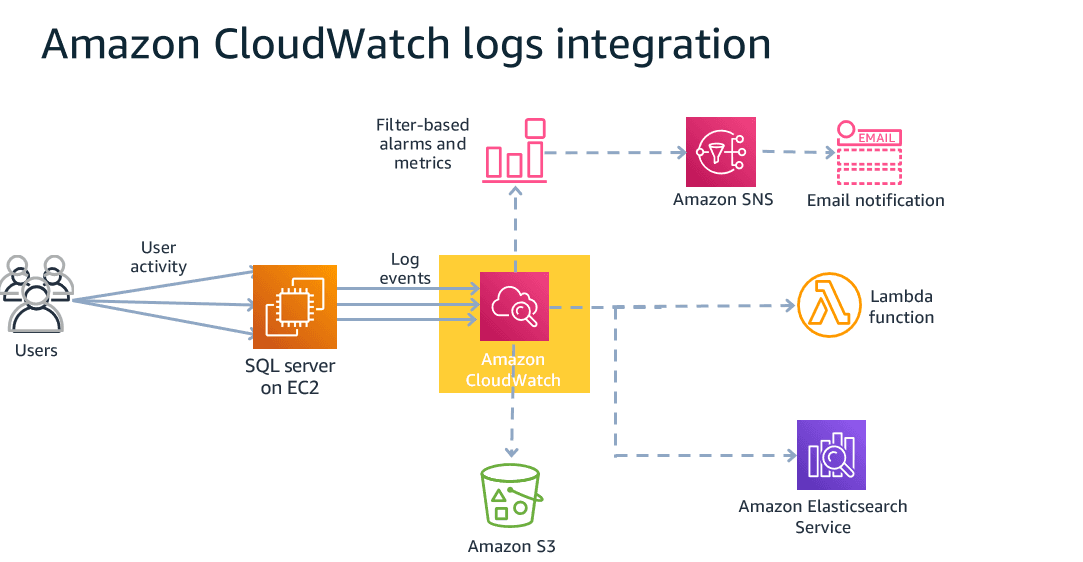
In AWS environments, Amazon CloudWatch acts as the central place where operational signals from different resources and applications come together. It collects metrics, logs, and events across services, which makes it more than an infrastructure monitoring tool. In distributed systems, that matters because visibility is no longer limited to EC2 health or database load. Teams need a clearer picture of how the full system is behaving across services, runtimes, and dependencies. That is why AWS CloudWatch observability is better understood as a unified observability layer than as a simple monitoring dashboard.
Traditional monitoring usually focuses on infrastructure signals such as CPU, memory, disk, and network. Those metrics still matter, but they rarely explain the full problem in cloud-native systems. A service may show normal CPU usage and still suffer from rising latency because a downstream dependency has slowed down. Error rates may increase after a configuration change even when no infrastructure metric looks alarming. This is where observability becomes wider than monitoring. It asks not only whether a resource is healthy, but how the system is actually behaving under real conditions.
That broader view usually comes down to three core signals:
- Metrics to show trends, load, latency, and error patterns
- Logs to capture events and detailed execution data
- Traces to follow requests across multiple components
CloudWatch covers the first two directly through CloudWatch Metrics and CloudWatch Logs. When paired with services such as AWS X-Ray, the system can go deeper into request tracing as well. This is what makes AWS CloudWatch observability useful in modern architectures built on microservices, containers, or serverless services. Tracing becomes even more useful when it is combined with the broader visualization tools available in CloudWatch. AWS X-Ray already provides request-level tracing across services, but CloudWatch ServiceLens helps bring those traces together with metrics and logs in one operational view. Instead of jumping between dashboards, teams can see service maps, latency spikes, and related logs in a single interface.
For example, if an API latency alarm fires, ServiceLens can show which downstream service is responsible for the slowdown and link directly to the relevant X-Ray traces. That shortens the path from detection to root cause analysis.
In systems where user experience is critical, CloudWatch Real User Monitoring (RUM) adds another perspective. While metrics and traces describe backend behavior, RUM captures how real users experience the application in the browser. It can measure page load time, JavaScript errors, and frontend latency across different regions or devices.
When these tools are used together, the observability picture becomes much clearer:
- Metrics show that latency is increasing
- X-Ray traces reveal where the request slows down
- ServiceLens connects the signals across services
- CloudWatch RUM shows whether users are actually experiencing degraded performance
This combination helps teams move from infrastructure visibility toward full end-to-end observability across both backend systems and real user interactions.
Using Custom Metrics to Measure What Infrastructure Metrics Cannot
AWS services such as EC2, RDS, ALB, and Lambda already send standard metrics to CloudWatch. Those metrics are useful, but they mainly describe resource state. In real systems, many serious issues start somewhere else. They often come from the application layer or from business logic that standard infrastructure metrics do not show clearly. That is where custom metrics become important.
Custom metrics let the application send its own signals to CloudWatch. These can reflect business activity, application health, or workload pressure that would be invisible in CPU and memory graphs alone. Common examples include:
- order count per minute
- payment failure rate
- average API latency
- queue backlog in a business workflow
These metrics can be pushed through the AWS SDK or through the CloudWatch Agent from workloads running on EC2, ECS, or EKS. The main value is not just extra data. It is the ability to measure what actually matters to the system and to users. In many cases, AWS CloudWatch observability becomes much more useful once business-level signals are added beside infrastructure metrics.
Another important part is dimension design. A metric becomes more useful when it can be broken down by context such as service name, environment, region, or endpoint. That makes troubleshooting much easier when something starts going wrong. At the same time, too many dimensions can increase the number of time series and push costs up. A good setup usually balances analysis depth with cost awareness instead of treating every possible label as necessary.
Cost management is another practical concern when designing AWS CloudWatch observability. While CloudWatch is powerful, it can also become one of the more expensive operational services if metrics and logs are collected without clear boundaries.
Two areas usually drive the largest cost:
- Log ingestion and storage.
Large volumes of application logs can quickly increase ingestion costs. Setting appropriate log retention policies helps control storage growth. For example, operational logs may only need to be retained for 7 to 30 days, while audit logs may require longer retention. Older logs can also be exported to Amazon S3 for cheaper long-term storage if needed. - Custom metrics with many dimensions.
Each unique combination of metric name and dimensions creates a new time series in CloudWatch. If metrics include too many labels such as service, endpoint, environment, region, and version simultaneously, the number of time series can grow rapidly. This not only increases cost but also makes dashboards harder to read. - Another factor is metric publishing frequency. Sending high-resolution metrics every second may be unnecessary for many workloads. In many cases, publishing metrics every 30 or 60 seconds still provides enough operational visibility while significantly reducing metric volume.
A practical observability design therefore balances visibility with cost awareness. Teams should decide intentionally which signals are truly valuable for operations rather than sending every possible metric or log event by default.
A practical way to design custom metrics is to start from Service Level Indicators. Teams usually care most about signals such as latency, error rate, and throughput. From there, they can send the right custom metrics and build alarms around SLO thresholds instead of around generic infrastructure events. That approach makes the observability layer more closely tied to actual service quality. It also helps teams detect unusual behavior earlier, before the issue becomes visible to users.
Building Dashboards Around Operational Context, Not Just Services
A useful dashboard should answer one question fast: what is going wrong, and where should the team look next? If it only shows generic infrastructure graphs, it usually slows that process down instead of helping.
A stronger CloudWatch dashboard is usually built around context like this:
- Production health: request volume, error rate, latency, saturation
- Business flow: successful orders, failed payments, queue depth, retry count
- Environment view: production, staging, or region-specific behavior
- Service domain: checkout, authentication, search, background processing
For example, an ecommerce dashboard is more useful when it puts these signals together in one place:
- ALB request count
- successful orders
- 5xx error rate
- payment API latency
- background job queue depth
That is a better fit for AWS CloudWatch observability because the team can read system behavior in business context, not just resource context.
CloudWatch also supports metric math, which matters more than it sounds. Instead of only plotting raw numbers, teams can calculate signals such as error rate from multiple metrics. Metric math becomes especially useful when teams want to derive operational signals from multiple raw metrics. Instead of plotting each metric separately, CloudWatch can calculate ratios or percentages that better represent service health.
A common example is calculating an API error rate from request metrics. Suppose the system publishes two metrics:
- m1 = number of failed requests
- m2 = total number of requests
Using CloudWatch metric math, the error rate can be calculated as:
(m1 / m2) * 100
This converts raw request counts into a percentage that is much easier to interpret on dashboards and alarms. For example, an alarm might trigger if the calculated error rate exceeds 2 percent for five consecutive minutes.
Metric math can also be used for other derived signals such as:
- success rate
- cache hit ratio
- request latency percentiles
- utilization percentages
By transforming raw metrics into higher-level indicators, dashboards become more meaningful and easier for operators to read during incidents.
Using Alarms for Early Warning Instead of Reactive Monitoring
Dashboards help teams see what is happening. Alarms help them act before the issue gets worse. That is an important shift in AWS CloudWatch observability, because good monitoring is not only about seeing a spike after users complain. It is about detecting abnormal behavior early enough to respond in time.
CloudWatch Alarms can be used in a few practical ways:
- send notifications through Amazon SNS
- route alerts to email or Slack
- trigger Lambda for automated response
- support actions such as scale-out, service restart, or traffic shift
Fixed thresholds still have their place, but they are not always enough. In systems where traffic changes by hour, weekday, or season, anomaly detection is often more useful. Instead of comparing a metric to one static number, CloudWatch can compare it to its normal pattern over time. That helps reduce noisy alerts in workloads with predictable traffic variation.
Another part that matters is alarm design. Too many alarms with poor thresholds usually create noise, not protection. That is how teams end up with alarm fatigue and start ignoring alerts altogether. A better approach is to tie alarms to service quality, prioritize the signals that affect users directly, and separate them by severity. The goal is not to alert on everything. It is to alert on the things that actually need action.
Investigating Issues with CloudWatch Logs and Logs Insights
Metrics usually tell you that something is wrong. Logs are what help explain the failure in concrete terms. In a distributed AWS system, that difference matters a lot. A spike in error rate may show up quickly on a dashboard, but the real investigation usually starts only when the team can trace the error back to a service, an endpoint, a request pattern, or a specific log event. That is where CloudWatch Logs becomes part of real observability rather than simple log storage.
CloudWatch Logs Insights makes that investigation much faster because it turns raw logs into something searchable and structured. Instead of scrolling through log streams one by one, teams can query logs, filter by fields, group events, and surface patterns that would otherwise take much longer to spot manually. This becomes especially useful in microservices environments, where logs are spread across multiple components and the root cause is rarely obvious from one place alone. A good query can quickly show which endpoint is failing most often, which service is producing unusual errors, or whether a sudden traffic pattern is tied to a specific source.
This also depends on how logs are written in the first place. Structured JSON logs are much easier to parse and query than plain text logs, especially when teams need to filter by endpoint, status code, service name, or request identifiers. That makes investigation more reliable and reduces the time spent cleaning up log data during an incident. Retention matters too. If logs are kept too briefly, historical analysis becomes weak. If they are kept too long without a clear policy, storage cost rises with limited operational benefit. In practice, Logs Insights works best when log structure and retention are both designed intentionally from the start.
Designing Observability as Part of the System
CloudWatch works best when it is planned as part of the architecture, not added after the system is already live. In ECS or EKS environments, teams often push logs and metrics through CloudWatch Agent or Fluent Bit. In Lambda-based systems, much of that path is already built in. The setup is different, but the design question is the same: what should the system be able to explain when something goes wrong?
That question usually comes before tooling choices.
Which metrics matter most?
Not every metric needs to be collected. The useful ones are the ones that help explain service quality, traffic behavior, and failure patterns.
How much should be logged?
Too little logging slows investigation. Too much creates noise and storage cost. The right level depends on what the team may need during incident analysis.
What should trigger alarms?
Alarm design should reflect real operational risk, not just technical movement in a graph. The point is to catch meaningful issues early, not to alert on every fluctuation.
This is also the part where real implementation experience starts to show. The hard part is rarely turning CloudWatch on. Haposoft has worked on AWS delivery in real production environments, where observability is needed to help teams troubleshoot faster and run systems more reliably. That is why observability should be treated as part of system design. A team should know, in advance, which signals will help answer production questions later. Once that thinking is in place, CloudWatch becomes more than a monitoring tool. It becomes part of how the system is run, debugged, and improved over time.
Conclusion
CloudWatch is most useful when it helps teams move from passive monitoring to active operations. Metrics, logs, dashboards, alarms, and log analysis all matter, but their value comes from how they work together in real production use. Used well, AWS CloudWatch observability gives teams faster visibility, faster investigation, and earlier warning before users are affected. Haposoft brings hands-on AWS implementation experience for that kind of work and is also recognized as an AWS Select Tier Services Partner.