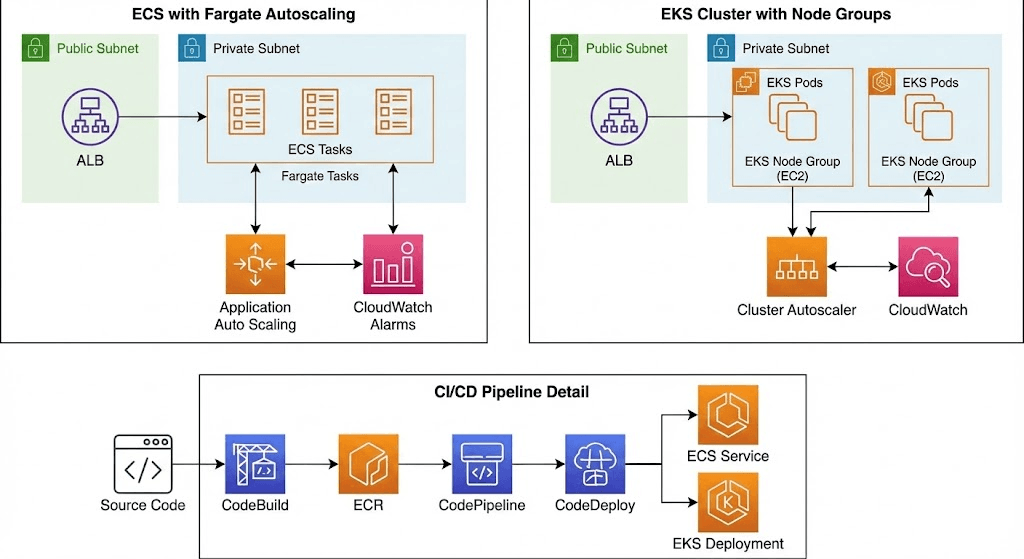
Running containers on AWS is straightforward. Operating microservices at scale is not. As systems grow from a handful of services to dozens or hundreds, the real challenges shift to networking, deployment safety, scaling strategy, and cost control. The choices you make between Amazon ECS, Amazon EKS, and AWS Fargate will directly shape how your platform behaves under load, how fast you can ship, and how much you pay each month. This article delves into practical solutions for building a robust AWS container platform.
The Scalability Challenges of Large-Scale Microservices
In practice, microservices do not become difficult because of containers themselves, but because of what happens around them as the system grows. A setup that works well with a few services often starts to break down when the number of services increases, traffic becomes less predictable, and deployments happen continuously across teams. What used to be a straightforward architecture gradually turns into a system that requires coordination across multiple layers, from networking to deployment and scaling.
Microservices are widely adopted because they solve real problems at the application level. They allow teams to move faster and avoid tight coupling between components, while also making it easier to scale specific parts of the system instead of everything at once. In most modern systems, these are not optional advantages but baseline expectations:
- Ability to scale based on unpredictable traffic patterns
- Independent deployment of each service
- Reduced blast radius when failures occur
- Consistent runtime environments across teams
Those benefits remain valid, but they also introduce a different kind of complexity. As the number of services grows, the system stops being about individual services and starts behaving like a distributed platform. At this point, the core challenges shift away from “running containers” and move into areas that require more deliberate design:
- Service-to-service networking in a dynamic cloud environment
- CI/CD pipelines that can handle dozens or hundreds of services
- Autoscaling at both application and infrastructure levels
- Balancing operational overhead with long-term portability
These are not edge cases but standard problems in any large-scale microservices system. AWS addresses them through a combination of Amazon ECS, Amazon EKS, and AWS Fargate, each offering a different trade-off between simplicity, control, and operational responsibility. The goal is not to choose one blindly, but to use them in a way that keeps the system scalable without introducing unnecessary complexity.
ECS, EKS, and Fargate – A Strategic Choice Analysis
Selecting between Amazon ECS, Amazon EKS, and AWS Fargate is not just a technical comparison. It directly affects how your microservices are deployed, scaled, and operated over time. In real-world systems, this decision determines how much infrastructure your team needs to manage, how flexible your architecture can be, and how easily you can adapt as requirements change. For teams working with AWS container orchestration, the goal is not to pick the most powerful tool, but the one that aligns with their operational model.
Amazon ECS: Simplicity and Power of AWS-Native
ECS is designed with an "AWS-First" philosophy. It abstracts the complexity of managing orchestrator components. Amazon ECS is designed for teams that want to focus on building applications rather than managing orchestration layers. It integrates tightly with AWS services, which makes it a natural choice for systems that are already fully built on AWS. Instead of dealing with cluster-level complexity, teams can define tasks and services directly, keeping the operational model relatively simple even as the system grows.
In practice, ECS works well because it removes unnecessary layers while still providing enough control for most production workloads. This makes ECS a strong option for teams deploying microservices on AWS without needing advanced customization in networking or orchestration.
- Fine-grained IAM roles at the task level for secure service access
- Faster task startup compared to Kubernetes-based systems
- Native integration with ALB, CloudWatch, and other AWS services
Amazon EKS: Global Standardization and Flexibility
EKS brings the power of the open-source community to AWS. Amazon EKS brings Kubernetes into the AWS ecosystem, which changes the equation entirely. Instead of a simplified AWS-native model, EKS provides a standardized platform that is widely used across cloud providers. This is especially important for teams that need portability or already have experience with Kubernetes. The strength of EKS lies in its ecosystem and extensibility. It allows teams to integrate advanced tools and patterns that are not available in simpler orchestration models:
- GitOps workflows using tools like ArgoCD
- Service mesh integration for advanced traffic control
- Advanced autoscaling with tools like Karpenter
For teams searching for aws kubernetes (EKS) solutions, the trade-off is clear: more flexibility comes with more operational responsibility. EKS is powerful, but it requires a deeper understanding of how Kubernetes components work together in production.
AWS Fargate: Redefining Serverless Operations
AWS Fargate takes a different approach by removing infrastructure management entirely. Instead of provisioning EC2 instances or managing cluster capacity, teams can run containers directly without worrying about the underlying compute layer. This makes it particularly attractive for workloads that need to scale quickly without additional operational burden.
Fargate is not an orchestrator, but a compute engine that can be used with both ECS and EKS. Its value becomes clear in scenarios where simplicity and speed are more important than deep customization. For teams evaluating aws fargate use cases, the limitation is that lower control over the runtime environment may not fit highly customized workloads. However, for many microservices architectures, that trade-off is acceptable in exchange for reduced operational overhead.
- No need to manage servers, patch OS, or handle capacity planning
- Per-task or per-pod scaling without cluster management
- Strong isolation at the infrastructure level
Comparison Table: ECS vs. EKS vs. Fargate
There is no universal answer to ECS vs EKS vs Fargate. The decision depends on how your system is expected to evolve and how much complexity your team can realistically handle. In many cases, teams do not choose just one, but combine them based on workload requirements.
|
Criteria |
Amazon ECS |
Amazon EKS |
AWS Fargate |
|
Infrastructure Management |
Low (AWS manages control plane) |
Medium (User manages add-ons/nodes) |
None (Fully Serverless) |
|
Customizability |
Medium (AWS API-driven) |
Very High (Kubernetes CRDs) |
Low (Limited root/ kernel access) |
|
Scalability |
Very Fast |
Depends on Node Privisioner (e.g., Karpenter) |
Fast (Per Task/Pod) |
|
Use Case |
AWS-centric workflows |
Multi-cloud & complex CNCF tools |
Zero-ops, event-driven workloads |
Designing Networking for Microservices on AWS
In microservices systems, networking is not just about connectivity. It determines how services communicate, how traffic is controlled, and how costs scale over time. As the number of services increases, small inefficiencies in network design can quickly become operational issues. A production-ready setup on AWS focuses on clarity in traffic flow and minimizing unnecessary exposure.
3.1. VPC Segmentation
A proper VPC structure starts with separating public and private subnets, where each layer has a clear and limited responsibility. This is essential to prevent unnecessary exposure and to maintain control over traffic flow as the system grows.
- Public Subnets: Used only for Application Load Balancers (ALB) and NAT Gateways. Containers should never be placed in this layer, as it exposes workloads directly to the internet and breaks the security boundary.
- Private Subnets: Host ECS tasks or EKS pods, where application services actually run. These workloads are not directly accessible from the internet. When they need external access, such as downloading libraries or calling APIs, traffic is routed through the NAT Gateway.
- VPC Endpoints (Key optimization): Instead of routing traffic through NAT Gateway, which adds data transfer cost, use:
- Gateway Endpoints for S3 and DynamoDB
- Interface Endpoints for ECR, CloudWatch, and other services
- This keeps traffic inside the AWS network and can significantly reduce internal data transfer costs, in some cases up to 80%.
Service-to-Service Communication
In a dynamic container environment, IP addresses are constantly changing as services scale or are redeployed. Because of this, communication cannot rely on static addressing and must be handled through service discovery.
- With ECS: Use AWS Cloud Map to register services and expose them via internal DNS (e.g. order-service.local).
- With EKS: Use CoreDNS, which is built into Kubernetes, to resolve service names within the cluster.
For more advanced traffic control, especially during deployments, a service mesh layer can be introduced:
- App Mesh: Enables traffic routing based on rules, such as sending a percentage of traffic to a new version (e.g. 10% to a new deployment).
This approach ensures that services can communicate reliably even as infrastructure changes, while also allowing controlled rollouts and reducing deployment risk.
CI/CD: Automation and Zero-Downtime Strategies
As the number of services increases, manual deployment quickly becomes a bottleneck. In a microservices system, changes happen continuously across multiple services, so the deployment process needs to be automated, consistent, and safe by default. A well-designed CI/CD pipeline is not just about speed, but about reducing risk and ensuring that each release does not affect system stability.
Standard Pipeline Flow
A typical pipeline for CI/CD in microservices on AWS follows a sequence of steps that ensure code quality, security, and deployment reliability. Each stage serves a specific purpose and should be automated end-to-end.
- Code Commit & Validation:
When code is pushed, the system runs unit tests and static analysis to detect errors early. This prevents broken code from entering the build stage. - Build & Containerization:
The application is packaged into a Docker image. This ensures consistency between environments and standardizes how services are deployed. - Security Scanning:
Images are scanned using Amazon ECR Image Scanning to detect vulnerabilities (CVE) in base images or dependencies. This step is important to prevent security issues from reaching production. - Deployment:
The new version is deployed using AWS CodeDeploy or integrated deployment tools. At this stage, the system must ensure that updates do not interrupt running services.
This pipeline ensures that every change goes through the same process, reducing variability and making deployments predictable even when multiple services are updated at the same time.
Blue/Green Deployment Strategy
In microservices environments, deployment strategy matters as much as the pipeline itself. Updating services directly using rolling updates can introduce risk, especially when changes affect service behavior or dependencies.
Blue/Green deployment addresses this by creating two separate environments:
- Blue environment: Current production version
- Green environment: New version being deployed
Instead of updating in place, the new version is deployed fully in parallel. Traffic is only switched to the Green environment after it passes health checks and validation. If any issue occurs, traffic can be immediately routed back to the Blue environment without redeploying.
This approach provides several advantages:
- Zero-downtime deployments for user-facing services
- Immediate rollback without rebuilding or redeploying
- Safer testing in production-like conditions before full release
For systems running microservices on AWS, Blue/Green deployment is one of the most reliable ways to reduce deployment risk while maintaining availability.
Autoscaling: Optimizing Resources and Real-World Costs
Autoscaling in microservices is not just about adding more resources when traffic increases. In practice, it is about deciding what to scale, when to scale, and based on which signals. If scaling is configured too simply, the system either reacts too late under load or wastes resources during normal operation.
On AWS, autoscaling typically happens at two levels: the application layer and the infrastructure layer. These two layers need to work together. Scaling containers without enough underlying capacity leads to bottlenecks, while scaling infrastructure without demand leads to unnecessary cost.
Application-Level Scaling
At the application level, scaling is usually based on how services behave under load rather than just raw resource usage. While CPU and memory are common metrics, they often do not reflect real demand in microservices systems. For example, a service processing queue messages may appear idle in terms of CPU but still be under heavy workload.
A more reliable approach is to scale based on metrics that are closer to actual traffic. This includes request count per target, response latency, or the number of messages waiting in a queue. These signals allow the system to react earlier and more accurately to changes in demand.
Instead of relying only on CPU thresholds, a typical setup combines multiple signals:
- Request-based metrics (e.g. requests per target)
- Queue-based metrics (e.g. SQS backlog)
- Custom CloudWatch metrics tied to business logic
Infrastructure-Level Scaling
At the infrastructure level, the goal is to ensure that there is always enough capacity for containers to run, without overprovisioning resources. When using EC2-backed clusters, this becomes a scheduling problem: containers may be ready to run, but no suitable instance is available. This is where tools like Karpenter or Cluster Autoscaler are used. Instead of scaling nodes based on predefined rules, they react to actual demand from pending workloads. When pods cannot be scheduled, new instances are created automatically, often selecting the most cost-efficient option available.
In practice, this approach introduces two important improvements. First, capacity is provisioned only when needed, which reduces idle resources. Second, instance selection can be optimized based on price and workload requirements, including the use of Spot Instances where appropriate. The result is a system that scales more flexibly and uses infrastructure more efficiently, especially in environments with variable or unpredictable traffic patterns.
Best Practices for Production-Grade Microservices on AWS
At scale, stability does not come from one decision, but from a set of consistent practices applied across all services. These practices are not complex, but they are what keep systems predictable as traffic increases and deployments become more frequent.
Keep the system immutable
Containers should be treated as immutable units. Once deployed, they should not be modified in place. Any change—whether configuration, dependency, or code—should go through the build pipeline and result in a new image. This ensures that what runs in production is always reproducible and consistent with what was tested.
- Do not SSH into containers to fix issues
- Rebuild and redeploy instead of patching in production
Handle shutdowns properly
Scaling and deployments continuously create and remove containers. If services are terminated too quickly, in-flight requests can be dropped, leading to intermittent errors that are difficult to trace. This small detail has a direct impact on user experience during deployments and scaling events.
- Configure a stop timeout (typically 30–60 seconds)
- Allow services to finish ongoing requests
- Close database and external connections gracefully
Centralize logging and observability
Containers are ephemeral, so logs stored inside them are not reliable. All logs and metrics should be sent to a centralized system where they can be analyzed over time.
- Push logs to CloudWatch Logs or a centralized logging stack
- Use metrics and tracing to understand system behavior
- Enable container-level monitoring (e.g. Container Insights)
Implement meaningful health checks
A running container does not always mean a healthy service. Health checks should reflect whether the service can actually handle requests.
- Expose a /health endpoint
- Verify connections to critical dependencies (database, cache)
- Avoid relying only on process-level checks
Accurate health checks allow load balancers and orchestrators to make better routing decisions.
Apply basic security hardening
Security should be part of the default setup, not an afterthought. Simple configurations can significantly reduce risk without adding complexity.
- Run containers as non-root users
- Use read-only root filesystems where possible
- Restrict permissions using IAM roles
Conclusion
The choice between ECS, EKS, and Fargate comes down to one thing: how much complexity your team can handle. ECS is simple and AWS-native. EKS is powerful but demands Kubernetes expertise. Fargate removes infrastructure entirely. In practice, most production systems mix them—using the right tool for each workload instead of committing to a single orchestrator. Haposoft helps you get this right. We design and deploy AWS container platforms that scale, stay secure, and don't waste your money. ECS, EKS, Fargate—we know when to use what, and more importantly, when not to.