Spec-Driven Development for Claude Code: Comparing CafeKit, GitHub Spec Kit, BMAD, and claude-code-spec-workflow
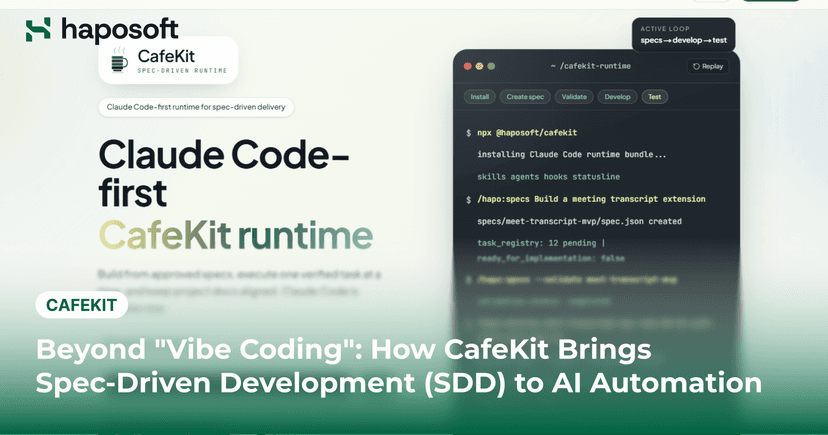
AI coding agents like Claude Code boost development speed, but they also introduce new problems. Code looks correct but doesn't meet requirements. Context gets lost between sessions. Large changes break design consistency. Spec-Driven Development (SDD) addresses these issues by adding structure: specify, plan, task, implement. Instead of prompting AI directly, teams define requirements first, then let AI execute against a clear spec. This article compares 4 SDD tools for Claude Code: CafeKit (Haposoft) GitHub Spec Kit BMAD-METHOD claude-code-spec-workflow We'll look at each tool's workflow, strengths, tradeoffs, and which scenarios they fit best—especially for B2B enterprise teams. Understanding Spec-Driven Development for Claude Code Most teams start using Claude Code in a straightforward way: write a prompt, generate code, review the output, then refine the prompt if something is missing. This works well for small features and isolated tasks. However, as projects become larger, requirements become harder to track, implementation decisions get scattered across conversations, and important context can easily disappear between sessions. Spec-Driven Development (SDD) takes a different approach. Instead of treating prompts as the primary source of instructions, SDD treats specifications as the foundation of the development process. Requirements, implementation plans, tasks, and technical decisions are documented before development begins, giving both developers and AI agents a shared source of truth throughout the project lifecycle. How the SDD Workflow Works Although every framework has its own methodology, most SDD workflows follow four core stages. Stage Description Specify Define requirements, business rules, and acceptance criteria Plan Create technical designs and implementation plans Task Break work into smaller executable tasks Implement Generate and review code based on approved specifications The goal is not to add more documentation. The goal is to reduce ambiguity. When requirements, plans, and tasks are already defined, Claude Code spends less time interpreting intent and more time executing clearly defined work. This becomes particularly valuable for large features involving multiple business rules, stakeholders, or development iterations. Why SDD Works Well with Claude Code One of the biggest challenges when working with AI coding agents is maintaining consistency over time. A feature that takes several days or weeks to complete may involve hundreds of requirements, decisions, and implementation details. Some of that information lives in prompts, some in documents, and some only exists in conversations between team members. SDD brings those decisions together in a structured workflow. Specifications define what needs to be built, plans define how it should be built, and tasks define what should be implemented next. Claude Code can then work against a documented plan rather than relying solely on prompt history, making the development process more predictable and easier to manage. Detailed Comparison of 4 SDD Tools for Claude Code CafeKit (Haposoft) cafekit.haposoft.com CafeKit is an open-source Spec-Driven Development (SDD) tool developed by Haposoft. The framework guides teams through the entire software development lifecycle, from requirements definition and technical design to implementation, testing, and review. Compared with other SDD tools in this comparison, CafeKit provides the most detailed phase structure and places a stronger emphasis on documentation, quality control, and traceability. Phase Structure: 6 Phases CafeKit organizes development into six distinct phases. Each phase produces its own outputs and serves as an input for the next stage of the workflow. Requirements Definition — Transform business requirements into structured specifications using EARS to eliminate ambiguity Design — Define architecture, database design, API contracts, and technical decisions Task Breakdown — Split the design into independently executable tasks with complexity estimates Implementation — Generate code for each task following the design and technical constraints Testing — Create test plans, test cases, and execute automated testing Review — Evaluate code quality, check consistency with specs, and record decisions The biggest difference from other tools is that CafeKit separates Testing and Review into their own phases. While GitHub Spec Kit and BMAD fold these activities into the implementation phase or leave them outside the main flow, CafeKit treats them as mandatory stages. This is especially valuable for projects requiring strict quality control or compliance with enterprise testing and review standards. Key Features Native Japanese language support for all generated artifacts (requirements docs, design docs, test plans, review records) Slash command system optimized for Claude Code with phase-specific templates Automatic generation of enterprise-format documentation alongside code Built on methodologies validated through real offshore delivery projects Best For CafeKit works well for both small and large projects. It is especially strong in enterprise environments with strict documentation requirements and formal quality control processes. The detailed phase structure is valuable for distributed teams where clear handoffs reduce miscommunication. Organizations that need formal deliverables at each stage will find CafeKit aligns with their workflows. GitHub Spec Kit github.com/github/spec-kit GitHub Spec Kit is the official Spec-Driven Development tool from GitHub, launched in September 2025. It has gained significant traction quickly and is currently the leading candidate for the de facto standard. The current version is 0.9.5 (early June 2026). GitHub describes it as an experimental project, and community feedback has been mixed—teams praise its structure and predictability but note higher token consumption and slower workflows compared to other tools. Phase Structure: 4 Phases /speckit.specify → /speckit.plan → /speckit.tasks → /speckit.implement Each command generates artifacts that feed into the next phase. The workflow is linear but supports iteration through modification commands. The specification phase captures requirements, the planning phase defines the approach, the tasks phase breaks work into units, and implementation generates the code. The biggest advantage of this structure is its simplicity. Teams can learn the four commands quickly and start using the tool with minimal ramp-up. However, the simplicity also means less granular control compared to CafeKit's 6-phase approach. Testing and review activities are not explicitly called out as separate phases, which may require teams to build their own quality gates outside the main flow. Key Features Agent-agnostic design supporting 20+ AI agents (Claude Code, GitHub Copilot, Cursor, Gemini CLI, and others) Two-layer customization: Extensions (add functionality) and Presets (modify existing workflows) Automatic feature numbering, branch creation, and directory structure generation Quality validation commands: /speckit.checklist (spec quality) and /speckit.analyze (consistency across artifacts) YAML-defined workflows supporting multi-step automation with pause and resume Active OSS community with rapid feature development Best For GitHub Spec Kit is ideal for teams building new products in a global, English-speaking environment. It works well for organizations using multiple AI coding agents simultaneously. Startups and modern SaaS companies following OSS trends will benefit from its active community and rapid development pace. Teams that prioritize staying current with the latest SDD practices should consider this tool. BMAD-METHOD docs.bmad-method.org BMAD stands for "Breakthrough Method for Agile AI-Driven Development." It is a framework that reimagines Spec-Driven Development within an Agile context. The defining characteristic is its multi-agent architecture, where different AI agents play specialized roles throughout the development process. The framework has recently migrated from .claude/commands to .claude/skills with the release of BMAD Method v6, which provides a native implementation for Claude Code. Phase Structure: 4 Phases Analysis → Planning → Solutioning → Implementation The Analysis phase focuses on understanding business requirements and user needs. The Planning phase creates epics, stories, and sprint plans. The Solutioning phase handles architecture and technical design. The Implementation phase generates code and executes tests. Unlike other tools that treat the workflow as a linear sequence, BMAD supports parallel execution across phases through its multi-agent system. Multiple specialized agents can work simultaneously on different aspects of the project, making it suitable for larger teams and longer-term projects. Key Features 21 specialized agents with distinct roles (Business Analyst, Product Manager, Architect, Developer, Scrum Master, QA) Over 50 guided workflows covering common development scenarios Native implementations for multiple AI tools: Claude Code, Cursor, Windsurf, GitHub Copilot Sprint planning, story creation, and parallel implementation support Expansion Packs for specialized domains like Game Dev, DevOps, and Infrastructure Strong alignment with Scrum and Agile methodologies Best For BMAD-METHOD is designed for Agile teams with clear role definitions. It works best for long-term product development where requirements evolve over multiple sprints. Large-scale refactoring projects also benefit from the structured agent collaboration. Teams with dedicated product owners and architects will find the role-based approach natural. claude-code-spec-workflow (Pimzino) github.com/Pimzino/claude-code-spec-workflow claude-code-spec-workflow is a lightweight, pragmatic SDD tool created by independent developer Pimzino. It currently has 2,544 stars on GitHub with approximately 5,450 downloads per month (version 1.5.9). The tool is designed for simplicity, with a single-command installation and a focus on practical, day-to-day development workflows. The author is currently shifting development focus to an MCP-based version (@pimzino/claude-code-spec-workflow-mcp), meaning the current version will receive fewer updates going forward. Phase Structure The tool provides two separate workflows depending on the type of work: New feature workflow: Requirements → Design → Tasks → Implementation Bug fix workflow: Report → Analyze → Fix → Verify The bug fix workflow is the most distinctive feature of this tool, as no other tool in this comparison provides a dedicated flow for bug fixes. This makes it particularly suitable for maintenance projects where fixing issues is a primary activity rather than building new features. Key Features Single-command installation: npx @pimzino/claude-code-spec-workflow Separate workflow for bug fixes (Report → Analyze → Fix → Verify) Real-time dashboard showing progress across specs Lightweight and easy to adopt with minimal setup Focus on practical, day-to-day development scenarios Best For claude-code-spec-workflow is best for maintenance projects focused on bug fixes and small feature additions. It works well for teams wanting to experiment with SDD without committing to a heavy framework. Small to medium-sized teams looking for a lightweight alternative will find it easy to adopt. Teams that primarily work on existing products rather than greenfield development will appreciate the dedicated bug fix workflow. CafeKit focuses on documentation, quality control, and phase-based delivery. GitHub Spec Kit emphasizes a simple and extensible workflow that works across multiple AI coding agents. BMAD-METHOD takes an Agile-first approach built around specialized AI roles, while claude-code-spec-workflow prioritizes simplicity and day-to-day practicality. The four tools share the same core idea: using specifications as the foundation for AI-assisted development. The difference lies in how much structure they introduce and which development challenges they prioritize. For most teams, the choice is less about features and more about workflow preferences. The best tool is usually the one that aligns with how the team already plans, reviews, and delivers software. Which Tool Should You Choose? The right choice depends on your project type, team structure, and development workflow. The table below summarizes the best fit for each scenario. Scenario Recommended Tool Why Enterprise projects with formal documentation requirements CafeKit Structured 6-phase workflow with dedicated testing and review stages New product development in global teams GitHub Spec Kit Strong community support, agent-agnostic design, and rapid ecosystem growth Agile teams managing long-term products BMAD-METHOD Role-based workflows aligned with Agile and Scrum practices Maintenance projects and bug-fix-heavy workloads claude-code-spec-workflow Dedicated bug fix workflow and minimal setup requirements Enterprise Projects with Formal Documentation Recommended Tool: CafeKit CafeKit's 6-phase structure aligns well with enterprise delivery processes that require formal artifacts at each stage. Requirements documents, design specifications, test plans, and review records are treated as part of the workflow rather than optional deliverables. Teams working with regulated industries, large clients, or strict quality assurance processes will benefit most from this approach. New Product Development in Global Teams Recommended Tool: GitHub Spec Kit GitHub Spec Kit is a strong option for teams building new products in distributed environments. Its agent-agnostic architecture supports a wide range of AI coding tools, while the active open-source community helps keep workflows and best practices up to date. Teams already following modern AI-assisted development trends will find adoption relatively straightforward. Agile Teams Managing Long-Term Products Recommended Tool: BMAD-METHOD BMAD-METHOD fits naturally into organizations that already operate with Agile roles and processes. The framework supports sprint planning, story creation, architecture design, and implementation through specialized AI agents. This makes it particularly useful for product teams working across multiple releases and evolving requirements. Maintenance Projects and Bug-Fix-Heavy Workloads Recommended Tool: claude-code-spec-workflow The dedicated bug fix workflow is the main differentiator here. Rather than adapting a feature-development process to maintenance work, teams can follow a workflow specifically designed for issue resolution. The lightweight setup and lower learning curve also make it a practical option for smaller teams. Can Teams Use Multiple SDD Tools? Absolutely. Adopting Spec-Driven Development does not require an organization to standardize on a single framework. In practice, different teams often have different requirements, workflows, and project types. A tool that works well for a new product team may not be the best choice for a maintenance team or an enterprise delivery project. A common approach is to select tools based on project characteristics rather than enforcing a single standard across the organization. For example, enterprise client projects with formal documentation requirements may benefit from CafeKit's structured workflow. Product teams building new applications may prefer GitHub Spec Kit because of its active ecosystem and agent-agnostic design. Teams focused primarily on maintenance and bug fixing may find claude-code-spec-workflow more practical due to its dedicated bug-fix workflow. The good news is that these tools are not mutually exclusive. Most operate as command-based workflows within Claude Code and can coexist within the same engineering organization. This allows teams to adopt the workflow that best matches their project needs while continuing to use a familiar AI development environment. The goal is not to choose the most feature-rich framework. The goal is to choose the workflow that helps your team deliver software more consistently. For many organizations, that may involve using different SDD tools for different types of work. Conclusion Spec-Driven Development has matured significantly since late 2025. GitHub Spec Kit leads in standardization and multi-agent support. BMAD-METHOD excels in Agile environments. claude-code-spec-workflow offers a lightweight option with unique bug fix workflows. CafeKit provides enterprise-grade structure with strong documentation support. The best choice depends on your project type and team structure. For hybrid environments, using multiple tools in parallel is a practical strategy. Ready to try Spec-Driven Development with your team? Start with CafeKit—it's open-source and ready to use. Install it today and experience structured AI-assisted development. bash npx @haposoft/cafekit GitHub Repository → Have questions about implementing SDD in your organization? Reach out—we are happy to share our experience. About CafeKit and Haposoft CafeKit is available at cafekit.haposoft.com. For implementation support, customization, or internal training, contact Haposoft. Haposoft JSC Headquarters: Hanoi, Vietnam Japan Office: Haposoft Japan (Ebisu, Tokyo) 200+ engineers, ISO 9001:2015 / ISO 27001 certified, AWS Select Tier Partner


.png&w=828&q=75)