A construction company needed a clearer way to manage project progress, field reports, and material updates. The new web system brings these workflows together so teams can work from one source of truth.
About the Client
A Japanese construction company runs several live projects at once. Yet their process splits time between desk tasks and outdoor jobs, so consistent data helps crews remain in sync, helping teams not fall behind. Old methods started lagging as details scattered across different documents, site changes took ages to log, plus workers kept using hand-updated sheets instead of smart tools. They wanted a single online platform capable of gathering everything into one place, working smoothly whether you're indoors or outdoors.
Challenges
The project needed to address several obstacles in the client’s day-to-day operations:
- Limited system accessibility: The setup now runs just on desktops, so crews out in the field can't check or adjust job details when they're actually at the location.
- Inflexible feature expansion: Needed new functions such as site reporting, material tracking, and export tools were required, but the outdated platform wouldn't allow changes.
- Scattered project details: Info sat in different spots, so teams sometimes made double versions or mismatched updates.
- Manual site-report workflows: Field workers used snapshots emailed around, while paperwork got pieced together offline - this dragged things out, mistakes popped up more often.
- Bad planning apps: They wanted a special schedule system, yet regular options didn't fit how they worked.
Solutions
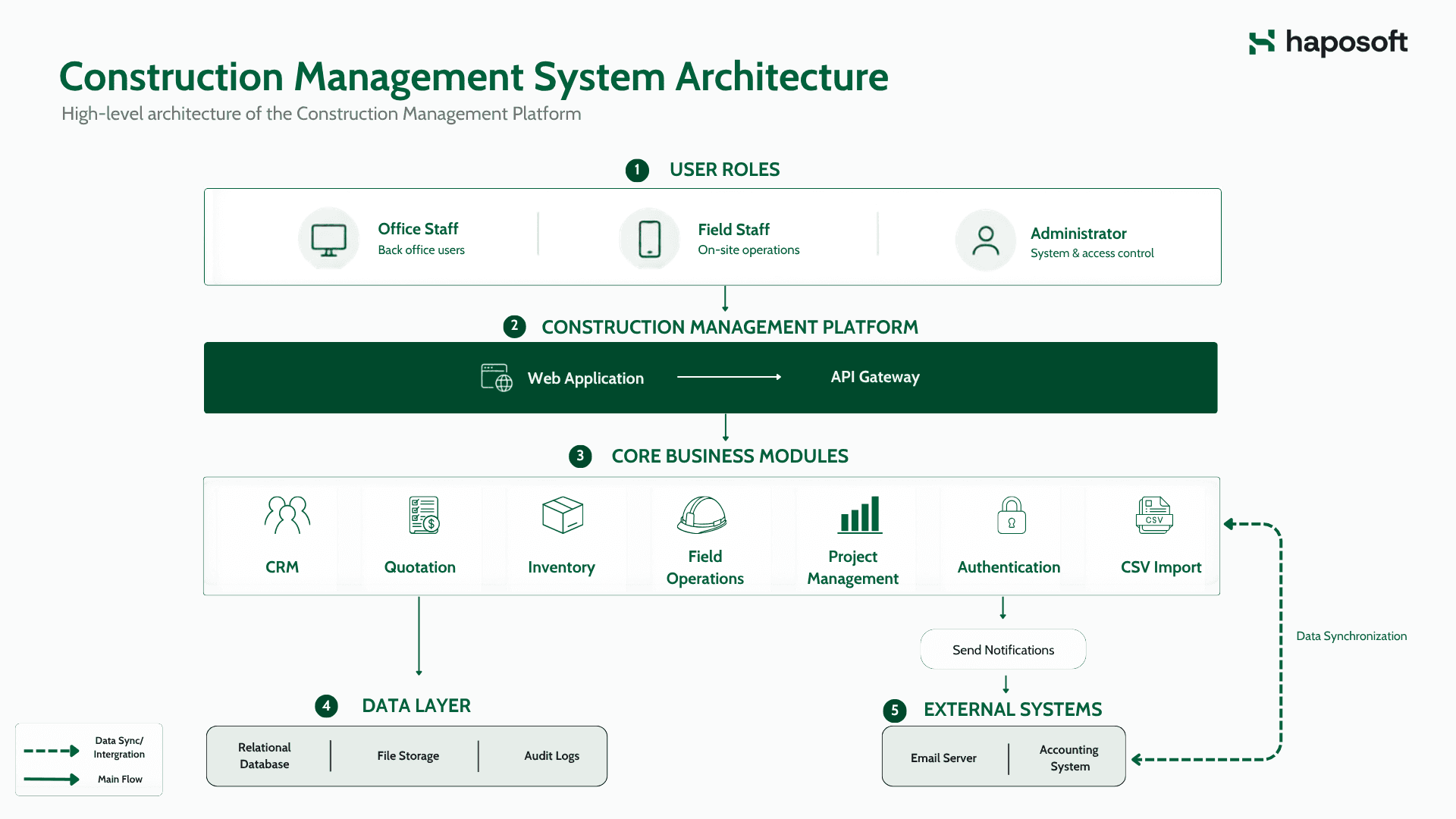
Responsive Web Platform for Office and On-site Work
To swap out the old desktop-only setup that field teams couldn’t access on-site, we made a web platform running just as well on phones as on computers. This gives crews the flexibility to use the system directly at the construction site instead of waiting to return indoors. Meanwhile, those back at the office see changes instantly with no delays. With everything happening in one shared and device-flexible environment, tasks move quicker without mix-ups.
Tech stack: VueJS for a lightweight, responsive interface; Python backend for handling business logic; SQL database stores project info in a solid, organized way.
Key Features:
- Unified Access: The same project screens adapt naturally to desktop and mobile, reducing friction between office and field work.
- Real-time Updates: Info from the site flows straight into the system, so supervisors always see how projects really stand.
- Consistent UI Patterns: A single design system keeps user actions predictable across devices.
Digitalizing Operational Workflows
The outdated setup kept project details scattered, leading to frequent gaps in timelines, supplies, or costs. Because of that, changes in one area didn't show up where they mattered most. So we rebuilt how information is organized, now each piece links directly to the others. As a result, when something gets updated, it syncs right away in every section. Teams can count on consistent info no matter what phase the work’s in.
Advanced On-Site Reporting with Built-In Photo Capture
Back then, field updates got put together by hand — photos came through email. Now we use a built-in tool so workers can snap pics right in the browser instead. They can tweak images on the spot before sending them off from their phones, add quick annotations to highlight issues, and attach those photos to the exact positions on the construction blueprint. With reports created directly inside the system rather than pieced together manually, info moves faster across teams. Plus, every report looks more alike now when it comes in.
Tech stack: VueJS camera integration, Python file processing, SQL metadata storage.
Key Features:
- Direct in-browser photo capture, no need to hop between programs.
- Inline editing tools - crop or turn them using built-in options.
- Annotation tools for marking issues directly on the image
- Attach photos to blueprint positions for clearer context.
- Standardized report formats that reduce review time.
.png&w=1920&q=75)
Material & Inventory Management with Automatic Alerts
Mistakes in stock counts happened a lot with spreadsheets. So we created an inventory tool that records when materials move and adjusts quantities right after data is entered. The system also keeps a full history of each material’s outbound records and automatically recalculates stock levels, making counts far more reliable. Supervisors can follow every item back to its project, and email alerts notify them when quantities fall below a preset threshold, keeping potential shortages from slipping through.
Tech stack: VueJS forms, Python business logic, SQL triggers and constraints.
Key Features:
- Real-time stock updates right after every trade, so you stay up-to-date without delay.
- Full traceability connects supplies to tasks along with people using them.
- Automatic stock recalculation based on material movements.
- History tracking for each outbound material entry.
- Email alerts when inventory drops below thresholds.
CSV Import and Standardized Exports
Teams often needed to update large datasets or share formatted reports. Now the system handles CSV uploads with straightforward checks, while letting users shoot out Excel or PDFs instantly. Less hands-on effort comes from this change, plus file versions stay aligned across people.
Tech stack: Python CSV/Pandas processing, SQL validation rules, Excel/PDF generators.
Key Features:
- Line-level error fix when bringing in info. Use step-by-step checks to keep things tidy during entry.
- Instant exports to Excel or PDF.
- Consistent templates applied through every task, keeping things smooth without extra fuss.
Attendance & Site Access Tracking
Managing who enters and leaves the construction site used to rely on manual logs that were often incomplete or hard to review. The new attendance module records check-in and check-out times directly in the system, tracks how many workers are on-site at any moment, and keeps daily history for quick lookups. This gives supervisors a clear view of staffing levels without depending on paper records.
Tech stack: VueJS forms and device input, Python validations, SQL attendance records.
Key Features:
- Automatic check-in/check-out logging for all site personnel.
- Daily access history stored for easy reference.
- Real-time headcount showing how many workers are currently on-site.
- Consistent digital records that replace manual paper logs.
.png&w=1920&q=75)
Rebuilt Data Model for Consistent Project Records
The old setup stored project details in different spots and lacked strong relational rules, so related data often drifted out of sync. Based on a full review of the company’s operational flow, we redesigned the entire database to reflect how work actually moves — starting at project launch, through materials, field notes, and payments, all the way to live views. With this structure, changes stay aligned across the system without repeating what was already entered, ensuring accuracy and consistency end to end.
Tech stack: SQL schema redesign with foreign-key constraints; Python ORM for predictable data behavior.
Key Features:
- Linked project, material, and financial records - whenever one changes, the rest adjust right after.
- Clear data flow mapped to real operational steps, cutting down on errors or mixed-up details
- Reliable reporting built on structured, clear, checked facts.
Scheduling & Project Timeline Management
.png&w=1920&q=75)
Managing schedules across multiple projects required tools that could adapt to how construction teams actually work. The new system brings project timelines, individual tasks, and contractor plans into one place so updates stay aligned as work changes on site.
Custom Scheduling Calendar Aligned With Internal Workflow
Scheduling in the company followed unique patterns that regular apps just didn’t fit, so we made a calendar that matches how teams really plan together. Workers can place jobs, adjust deadlines, or align plans with project updates right within the tool. The calendar also supports day-to-day work management, letting users add their own tasks, view colleagues’ schedules when needed, and create shared groups for team-wide visibility. It shifts around limits set by departments while managing each group’s way of working on its own.
Tech stack: VueJS custom calendar component; Python scheduling engine.
Key Features:
- Task assignment and work planning embedded in project workflows.
- Automatic syncing between schedules and project progress.
- Flexible rules that fit the company's own timetable needs.
- Personal task scheduling for individual users.
- Optional visibility into colleagues’ calendars.
- Shared group calendars for coordinated team planning.
Construction Progress Calendar for Contractors
Each construction project involves multiple contractors working on different timelines, and the company needed a clearer way to see how these schedules overlap. We added a dedicated progress calendar that displays contractor activities directly on the project timeline, showing planned work, adjustments, and delays in a single view. This helps supervisors track overall progress across all projects they manage and make timely scheduling decisions when plans shift.
Tech stack: VueJS timeline and calendar components; Python scheduling engine; SQL progress records.
Key Features:
- Visual timeline of contractor schedules for each project.
- Overview of progress across multiple active projects.
- Easy adjustments when plans change on site.
- Clear visibility to avoid schedule conflicts between contractors.
Results
The new platform made things quicker while boosting precision throughout everyday tasks. Workers use a single setup now - data’s easier to understand, plus jobs get done faster out in the field.
- Up to 70% speed boost on field updates: Snapping pics right away plus using set templates cuts down report prep time.
- 100% Mobile-Compatible System: Teams can update tasks from site visits instead of driving back downtown.
- Zero Manual Excel Workflows: All reporting, inventory updates, and data loading happen inside the platform, not manual in files.
- Fully Linked and Consistent Data: Unified relationships between project, material, and financial records removed mismatches and duplication.
- Ready for Future Expansion: The new architecture supports upcoming modules such as HR and equipment tracking.
Conclusion
The new system handed the client a simpler, quicker, stronger method to handle their work. Where once everything relied on scattered documents, handwritten updates, or isolated apps, it now flows into a single hub fitting both site crews and desk staff. With growth moving forward, this solution holds solid ground they can trust while pushing ahead.
How Haposoft Can Help
Haposoft creates tailored web applications, also mobile apps for companies wanting tools that fit how they actually work. The aim is simple - tech that works reliably each day, not just looks good on paper. Rather than big claims, we focus on stuff that survives tough situations. Think less hype, more results when it counts.
If you're trying to boost digital efforts or streamline some tasks, we can help every step of the way - starting from early talks up through setting up tools your team actually uses daily.
Reach out to us anytime to discuss your needs.






.png&w=828&q=75)