Auto Scaling looks simple on paper. When traffic increases, more EC2 instances are launched. When traffic drops, instances are terminated. In production, this is exactly where things start to go wrong.
Most Auto Scaling failures are not caused by scaling itself. They happen because the system was never designed for instances to appear and disappear freely. Configuration drifts between machines, data is still tied to local disks, load balancers route traffic too early, or new instances behave differently from old ones. When scaling kicks in, these weaknesses surface all at once.
A stable EC2 Auto Scaling setup depends on one core assumption: any virtual machine can be replaced at any time without breaking the system. The following sections break down the practical architectural decisions required to make that assumption true in real production environments.
1. Instance Selection and Classification
Auto Scaling does not fix poor compute choices. It only multiplies them. When new instances are launched, they must actually increase usable capacity instead of introducing new performance bottlenecks. For this reason, instance selection should start from how the workload behaves in production, not from cost alone or from what has been used historically.
Different EC2 instance families are optimized for different resource profiles, and mismatching them with the workload is one of the most common causes of unstable scaling behavior.
Comparison of Common Instance Families
|
Instance Family |
Technical Characteristics |
Typical Workloads |
|
Compute Optimized (C) |
Higher CPU-to-memory ratio |
Data processing, batch jobs, high-traffic web servers |
|
Memory Optimized (R/X) |
Higher memory-to-CPU ratio |
In-memory databases (Redis), SAP, Java-based applications |
|
General Purpose (M) |
Balanced CPU and memory |
Backend services, standard application servers |
|
Burstable (T) |
Short-term CPU burst capability |
Dev/Staging environments, intermittent workloads |
In production, instance sizing should be revisited after the system has been running under real load for a while. Actual usage patterns—CPU, memory, and network traffic—tend to differ from what was assumed at deployment. CloudWatch metrics, together with AWS Compute Optimizer, are enough to show whether an instance type is consistently oversized or already hitting its limits.
Note on Burstable (T) instances:
In CPU-based Auto Scaling setups, T3 and T4g instances can be problematic. Once CPU credits are depleted, performance drops hard and instances may appear healthy while responding very slowly. When scaling is triggered in this state, the Auto Scaling Group adds more throttled instances, which often makes the situation worse instead of relieving load.
Mixed Instances Policy
To optimize cost and improve availability, Auto Scaling Groups should use a Mixed Instances Policy. This allows you to:
- Combine On-Demand instances (for baseline load) with Spot Instances (for variable load), reducing costs by 70–90%.
- Use multiple equivalent instance types (e.g., m5.large, m5a.large) to mitigate capacity shortages in specific Availability Zones.
2. AMI Management and Immutable Infrastructure
If any virtual machine can be replaced at any time, then configuration cannot live on the machine itself. Auto Scaling creates and removes instances continuously. The moment a system relies on manual fixes, ad-hoc changes, or “just this one exception,” machines start to diverge. Under normal traffic, this rarely shows up. During a scale-out or scale-in event, it does—because new instances no longer behave like the old ones they replace.
This is why the AMI, not the instance, is the deployment unit. Changes are introduced by building a new image and letting Auto Scaling replace capacity with it. Nothing is patched in place. Nothing is carried forward implicitly. Instance replacement becomes a controlled operation, not a source of surprise.
- Hardening
Operating system updates, security patches, and removal of unnecessary services are done once inside the AMI. Every new instance starts from a known, secured baseline.
Agent integration
Systems Manager, CloudWatch Agent, and log forwarders are part of the image itself. Instances are observable and manageable the moment they launch, not after someone logs in to “finish setup.” - Versioning
AMIs are explicitly versioned and referenced by tag. Rollbacks are performed by switching versions, not by repairing machines in place.
3. Storage Strategy for Stateless Scaling
Local state does not survive that assumption. This is where many otherwise well-designed systems quietly violate their own scaling model. Data is written to local disks, caches are treated as durable, or files are assumed to persist across restarts. None of these assumptions hold once Auto Scaling starts making decisions on your behalf.
To keep instances replaceable, the system must be explicitly stateless.
- EBS and gp3 volumes
EBS is suitable for boot volumes and ephemeral application needs, but not for persistent system state. gp3 is preferred because performance is decoupled from volume size, making instance replacement predictable and cheap. - Externalizing persistent data
Any data that must survive instance termination is moved out of the Auto Scaling lifecycle:- Shared files → Amazon EFS
- Static assets and objects → Amazon S3
- Databases → Amazon RDS or DynamoDB
- Accepting termination as normal behavior
Instances are not protected from termination; the architecture is. When an instance is removed, the system continues operating because no critical data depended on it.
4. Network and Load Balancing Design
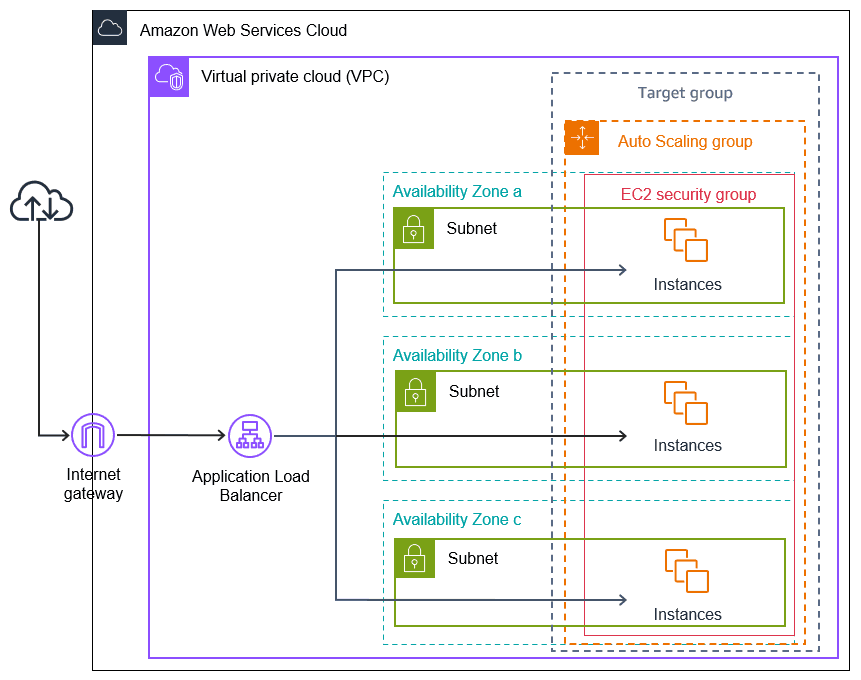
If any virtual machine can be replaced at any time, the network layer must assume that failure is normal and localized. Network design cannot treat an instance or an Availability Zone as reliable. Auto Scaling may remove capacity in one zone while adding it in another. If traffic routing or health evaluation is too strict or too early, instance replacement turns into cascading failure instead of controlled churn.
- Multi-AZ Deployment: Auto Scaling Groups should span at least three Availability Zones. This ensures that instance replacement or capacity loss in a single zone does not remove the system’s ability to serve traffic. Instance replaceability only works if the blast radius of failure is limited at the AZ level.
- Health Check Grace Period: Load balancers evaluate instances mechanically. Without a grace period, newly launched instances may be marked unhealthy while the application is still warming up. This causes instances to be terminated and replaced repeatedly, even though nothing is actually wrong. A properly tuned grace period (for example, 300 seconds) prevents instance replacement from being triggered by normal startup behavior.
- Security Groups: Instances should not be directly exposed. Traffic is allowed only from the Application Load Balancer’s security group to the application port. This ensures that new instances join the system through the same controlled entry point as existing ones, without relying on manual rules or implicit trust.
5. Advanced Auto Scaling Mechanisms
If instances can be replaced freely, scaling decisions must be accurate enough that replacement actually helps instead of amplifying instability.
Relying only on CPU utilization assumes traffic patterns are simple and linear. In real production systems, traffic is often bursty, uneven, and driven by application-level behavior rather than raw CPU usage. Fixed threshold models tend to react too late or overreact, turning instance replacement into noise instead of recovery.
Advanced Auto Scaling mechanisms exist to keep instance churn controlled and intentional.
Dynamic Scaling
Dynamic scaling adjusts capacity in near real time and is the foundation of self-healing behavior.
Target Tracking is the most commonly recommended approach. A target value is defined for a metric such as CPU utilization, request count, or a custom application metric. Auto Scaling adjusts instance count to keep the metric close to that target. This avoids hard thresholds that trigger aggressive scale-in or scale-out events.
Target Tracking is recommended because it:
- Keeps load at a stable, predictable level
- Reduces both under-scaling and over-scaling
- Minimizes manual tuning as traffic patterns change
To ensure fast reactions, detailed monitoring (1-minute metrics) should be enabled. This is especially critical for workloads with short but intense traffic spikes, where metric latency can directly impact service stability.
Predictive Scaling
Predictive scaling uses historical data—typically at least 14 days—to detect recurring traffic patterns. Instead of reacting to load, the Auto Scaling Group prepares capacity ahead of time. This is especially relevant when instance startup time is non-trivial and late scaling would violate latency or availability expectations.
Warm Pools
Warm Pools address the gap between instance launch and readiness.
- Instances are kept in a stopped state with software already installed
- When scaling is triggered, instances move to In-Service much faster
- Replacement speed improves without permanently increasing running capacity
6. Testing and Calibration
If instances are meant to be replaced freely, scaling behavior must be tested under conditions where replacement actually happens. Auto Scaling configurations that look correct on paper often fail under real load. Testing is not about proving that scaling works in ideal conditions, but about exposing how the system behaves when instances are added and removed aggressively.
- Load Testing: Tools such as Apache JMeter are used to simulate traffic spikes. The goal is not just to trigger scaling, but to observe whether new instances stabilize the system or introduce additional latency.
- Termination Testing: Instances are deliberately terminated to verify ASG self-healing behavior and service continuity at the load balancer.
- Cooldown Periods: Cooldown intervals are adjusted to prevent thrashing—rapid scale-in and scale-out caused by overly sensitive policies. Replacement must be deliberate, not reactive noise.
Conclusion
Auto Scaling works only when instance replacement is treated as a normal operation, not an exception. When that assumption is enforced consistently across the system, scaling stops being fragile and starts behaving in a predictable, controllable way under real production load.
If you are operating Auto Scaling workloads on AWS and want to validate this in practice, Haposoft can help. Reach out if you want to review your current setup or pressure-test how it behaves when instances are replaced under load.