Once you understand EC2 instance types and pricing models, the real challenge begins: running EC2 reliably and securely in production.
This part focuses on how EC2 is actually operated in real-world systems—covering security hardening, network design, storage management, and long-term cost optimization. The goal is not just to “run” EC2, but to run it safely, efficiently, and at scale.
Securing EC2 in Production Environments
When EC2 moves from development to production, security stops being optional. At this stage, mistakes are no longer just configuration issues. They become real risks: data leaks, service disruption, or compliance violations.
In practice, most EC2 security problems do not come from sophisticated attacks. They come from overly permissive network access, forgotten rules, and shortcuts taken during early development. This section focuses on how to secure EC2 the way it is actually done in production, starting from the most fundamental control: Security Groups.
5.1. What Security Groups Really Are
Security Groups are often described as “virtual firewalls,” but that description is incomplete.
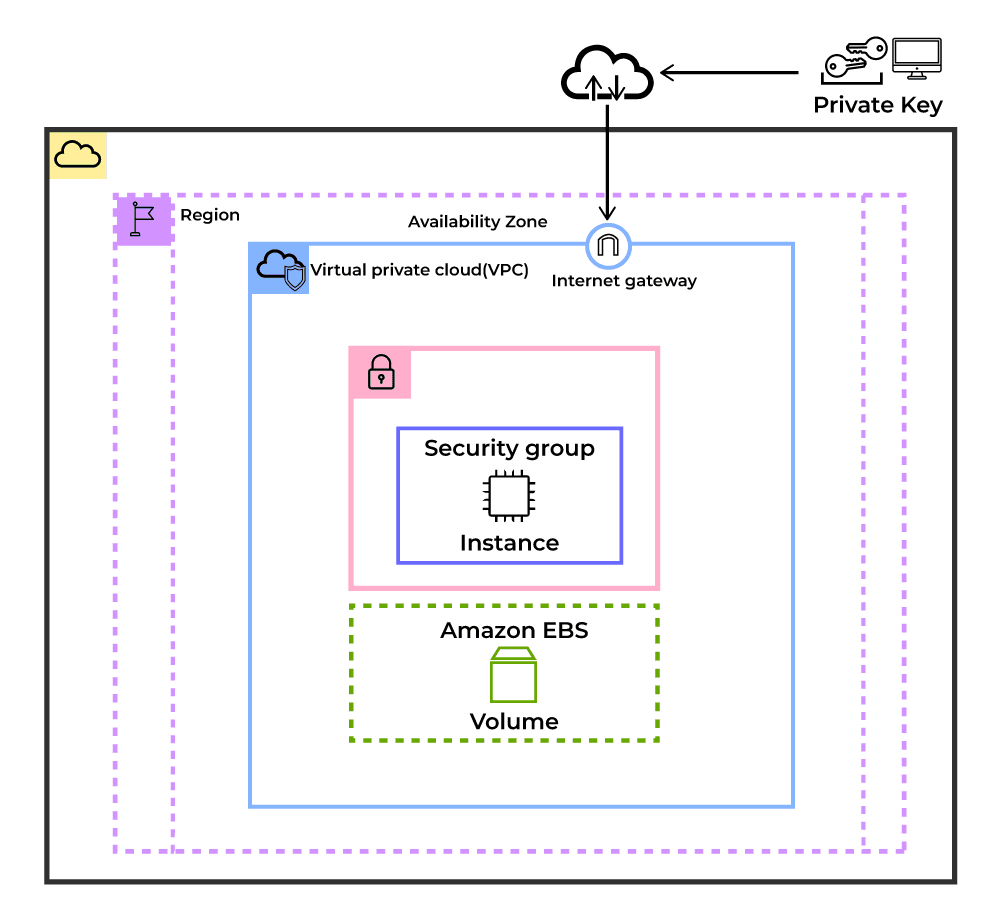
In production, a Security Group is better understood as a contract. It defines exactly who is allowed to talk to an instance, on which port, and for what purpose.Security Groups operate at the instance level and are stateful. If an inbound connection is allowed, the return traffic is automatically permitted. There is no need to create outbound rules for responses.
Two important implications often overlooked:
- There are no deny rules. Anything not explicitly allowed is blocked.
- Changes take effect immediately, without restarting the instance.
Because of this, Security Groups become the first and most important security boundary for EC2.
Each rule consists of:
- Protocol (TCP, UDP, ICMP)
- Port range
- Source / Destination (CIDR or Security Group reference)
5.2. Common Security Group Patterns
Security Groups are intentionally simple.
They do not try to model complex firewall logic. Instead, they focus on one principle: explicitly allow what is needed, block everything else by default. This design leads to a few behaviors that are important in practice.
Security Group rules are only used to define allowed traffic. There is no concept of a deny rule. If a request does not match any rule, it is automatically rejected. This makes Security Groups predictable and reduces the risk of hidden exceptions. When a Security Group is created, AWS adds a default outbound rule that allows all traffic. This is done to avoid breaking outbound connectivity for applications. Inbound access, however, starts fully closed.
Inbound: Deny all (no rules)
Outbound: Allow all (0.0.0.0/0, all protocols, all ports)
Because of this default behavior, Security Groups in production are usually built around application roles, not individual machines. A common example is a web-facing instance. It needs to accept traffic from the internet on HTTP and HTTPS, but administrative access should be limited to a private network.
Web server security group
- Allow HTTP (80) from the internet
- Allow HTTPS (443) from the internet
- Allow SSH (22) only from internal IP ranges
This setup exposes only what users actually need, while keeping operational access controlled. For databases, the pattern is even stricter. A database instance should never accept traffic directly from the internet. Instead, it only allows connections from application servers.
Database security group
- Allow database port (e.g. 3306) only from the application Security Group
This pattern enforces a clear separation between layers and significantly reduces the attack surface, even if a public-facing component is compromised.
5.3. Advanced Security Group Best Practices
In dynamic environments, using IP addresses directly in rules can become difficult to manage. For this reason, Security Groups can reference other Security Groups as traffic sources or destinations.
- Use Security Group References Instead of IP Addresses
Do not hardcode IP ranges unless there is no alternative. In production, instances are replaced frequently due to scaling, failures, or deployments. IP-based rules break silently in these scenarios.
Referencing another Security Group creates a stable dependency model:
- Access follows the service, not the instance
- Auto Scaling works without rule changes
- Multi-AZ deployments remain consistent
2. Follow least privilege strictly
Least privilege must be applied strictly at the network level. Avoid allowing traffic from entire subnets or VPC CIDR blocks unless the architecture explicitly requires it. Each inbound rule should map to one service, one protocol, and one operational need. Broad or convenience-based rules increase blast radius and make incident response harder.
3. Use descriptive naming
Security Group names should describe purpose, not environment. Names like alb-sg, app-tier-sg, or db-private-sg make ownership and access paths obvious during reviews and incidents. Generic or ambiguous names slow down audits and increase the chance of misconfiguration.
4. Periodically audit unused rules
Unused rules should be reviewed and removed regularly. Temporary access added during debugging or migrations often becomes permanent by accident. Over time, these rules lose context and turn into silent security risks. A smaller rule set is easier to understand and safer to operate.
5. Combine with other security layers
Security Groups control instance-level access only.They should be combined with Network ACLs, AWS WAF, and AWS Shield for layered defense in internet-facing systems.
6. IP Addressing and Network Design in EC2
6.1. Private IP Addresses
Private IP addresses are used for communication inside a private network.
They are not reachable from the public internet. When an EC2 instance needs to access external services, traffic must go through a NAT gateway or NAT instance. Private IPs themselves cannot communicate directly with the internet.
AWS supports three private IPv4 address ranges:
- 10.0.0.0/8
- 172.16.0.0/12
- 192.168.0.0/16
Private IPs should be used whenever instances only need to communicate with internal services.
Typical use cases include:
- Inter-service communication, such as database connections and microservices
- Internal load balancers, for example Application Load Balancers in private subnets
- VPC peering, enabling communication between multiple VPCs
- VPN connections between on-premises systems and AWS
6.2. Public IP Addresses
Public IP addresses allow an EC2 instance to communicate both inside the VPC and with the public internet. They can be any IPv4 address except those belonging to the private IP ranges.
A Public IP has the following characteristics:
- Dynamic assignment: The IP address can change when the instance is stopped and started again.
- Internet Gateway required: An Internet Gateway must be attached to the VPC for traffic to be routed to and from the internet.
- Billed separately: Public IPv4 addresses incur a small hourly charge according to the pricing policy of Amazon Web Services.
- Globally unique: Public IPv4 addresses are globally unique on the internet.
There are several limitations to be aware of. Because of these constraints, Public IPs are generally unsuitable for workloads that require a stable or predictable endpoint. A Public IP shouldn’t:
- Changes when the instance is stopped or started
- Cannot be reassigned to another instance
- Is released when the instance is terminated
- Does not allow control over the specific IP address assigned
6.3. Elastic IP (EIP)
By default, a Public IP address changes whenever an EC2 instance is stopped and started. This behavior is acceptable for temporary workloads, but it quickly becomes a problem in production systems that require a stable endpoint. Elastic IPs are designed to solve this exact limitation.
An Elastic IP is a reserved public IPv4 address that you attach to an EC2 instance. It does not change when the instance is stopped or restarted, and it can be moved to another instance if needed. Key properties of Elastic IPs:
- Static public IP: The address remains the same across stop and start operations.
- Reassignable: An Elastic IP can be detached from one instance and attached to another, which is useful during instance replacement or recovery.
- Regional resource: An Elastic IP belongs to a specific AWS Region and cannot be moved across regions.
- Charged when unused: AWS charges for Elastic IPs that are not attached to a running instance.
How Elastic IPs should be used in production?
- Use sparingly
Elastic IPs should only be used when an external system requires a fixed IP address. This is common with IP allowlists and legacy integrations.
- Consider alternatives first
For most production systems, Elastic IPs are not the best default:
- Application Load Balancer with Route 53 provides stable DNS and failover
- CloudFront works better for global access with custom domains
- NAT Gateway is the correct choice for outbound-only internet traffic
- Avoid waste
Elastic IPs that are attached to stopped instances or left unused still generate cost. Unused Elastic IPs should be released. - Monitor usage and cost
Elastic IP usage is easy to forget.
Billing alerts help prevent silent charges from accumulating.
Cost overview
- Attached to a running instance: no additional cost
- Attached to a stopped instance: $0.005 per hour
- Not attached: $0.005 per hour
- Additional Elastic IPs per instance: $0.005 per hour
6.4. IPv6 Support
EC2 supports dual-stack networking, allowing instances to have both IPv4 and IPv6 addresses.
All IPv6 addresses in AWS are global unicast, which means they are publicly routable by default. There is no additional cost for using IPv6, and the 128-bit address space removes concerns about IPv4 exhaustion.
To enable IPv6 on EC2, the following steps are required:
- Enable an IPv6 CIDR block at the VPC level
- Associate an IPv6 CIDR block with the subnet
- Add IPv6 routes in the route table
- Allow IPv6 traffic in Security Group rules
- Enable automatic IPv6 assignment on the EC2 instance
Once configured, EC2 instances can operate in dual-stack mode and communicate over both IPv4 and IPv6 as needed.
7. Managing Storage: EBS, AMIs, and Snapshots
7.1. Elastic Block Store (EBS)
Elastic Block Store is AWS’s block storage service for EC2. An EBS volume can be attached to and detached from EC2 instances, which allows data to persist independently of the instance lifecycle and be reused across instances.
When creating an EBS volume, IOPS and throughput can be configured based on workload requirements. EBS volumes can only be expanded in size and cannot be reduced.
After increasing a volume size through the AWS console or CLI, the filesystem must also be expanded at the operating system level. If this step is skipped, the additional capacity will not be visible to the OS.
Key EBS features include:
- Encryption using AES-256 for data at rest and in transit
- Multi-Attach support for io1 and io2 volume types
- Point-in-time snapshots stored in Amazon S3
- Elastic Volumes, allowing size, type, and performance changes without downtime
7.2. Amazon Machine Images (AMI)
An Amazon Machine Image is a template used to launch EC2 instances.
An AMI includes:
- The operating system and preinstalled software
- One or more attached EBS volumes
- Launch permissions that control who can use the AMI
- Block device mappings for storage configuration
AMIs can be created from existing EC2 instances. This allows you to capture a known-good configuration and reuse it to launch identical instances.
AMIs can be:
- Public, provided by AWS or the community
- Commercial AMIs from AWS Marketplace
- Private AMIs within your AWS account
- Shared AMIs from other AWS accounts
In production, AMIs are commonly used to standardize deployments, reduce setup time, and support faster recovery during scaling or instance replacement.
7.3. Snapshots
Snapshots are point-in-time backups of EBS volumes stored in Amazon S3. The first snapshot captures the entire volume. Subsequent snapshots are incremental, storing only the blocks that have changed since the previous snapshot.
Snapshots can be used to:
- Restore data after failure
- Create new EBS volumes
- Create new AMIs
- Copy data across AWS Regions
Creating a snapshot does not interrupt the running EC2 instance. However, for consistency-sensitive workloads, snapshots should be taken when the volume is in a stable state.
Key snapshot characteristics:
- Incremental backups to reduce storage cost
- Cross-region copy support
- Encrypted snapshots for encrypted EBS volumes
- Point-in-time recovery capability
- Pay only for stored data, not full volume size
7.4. Optimizing EBS Performance and Cost
EBS performance can be tuned by adjusting IOPS and throughput based on workload requirements.
IOPS optimization
- gp3: baseline 3,000 IOPS, scalable up to 16,000 IOPS
- io2: supports up to 256,000 IOPS with Multi-Attach capability
- Provision higher IOPS for workloads that require consistent and predictable performance
- Use EBS-optimized instances to guarantee sufficient bandwidth between EC2 and EBS
Throughput optimization
- gp3: throughput can be independently configured up to 1,000 MiB/s
- st1: HDD volumes optimized for sequential access patterns
- Use RAID 0 to increase throughput, with careful consideration of failure risk
- Pre-warm volumes by reading all blocks after restoring from a snapshot
Cost optimization
- Migrate from gp2 to gp3 to reduce storage cost (up to 20%)
- Right-size volumes based on actual usage by monitoring CloudWatch metrics
- Apply snapshot lifecycle policies to automatically clean up old backups
- Use Cold HDD (sc1) volumes for infrequently accessed data
8. Running EC2 in Production: Operational Best Practices
8.1. Criteria for Choosing an AWS Region
Choosing an AWS Region affects latency, compliance, cost, and service availability. Each of these factors should be evaluated before launching EC2 instances in production.
Latency
- Choose the region closest to end users to reduce access latency
- Asia Pacific (Singapore) – ap-southeast-1: optimal for Southeast Asia users
US East (N. Virginia) – us-east-1: global services such as CloudFront and Route 53 - Europe (Ireland) – eu-west-1: suitable for European users
- Latency testing tools: CloudPing, AWS Region latency checker
Legal and compliance requirements
- Some data must be stored in specific regions due to regulations
- GDPR compliance: EU regions for European citizen data
- Data residency: government and financial sector requirements
- SOC / PCI DSS: available only in regions with required certifications
Cost
- EC2 and AWS service pricing varies by region
- us-east-1 (N. Virginia): usually the lowest cost, reference pricing
- us-west-2 (Oregon): competitive pricing for US West Coast
- ap-southeast-1 (Singapore): higher cost, good for Asia Pacific
- eu-west-1 (Ireland): moderate cost for European workloads
Service availability
Not all instance types and AWS services are available in every region. New instance families typically launch in major regions first, some managed services are region-specific, and advanced AI/ML services may have limited regional availability.
8.2. Instance Sizing and Capacity Planning
When launching an EC2 instance, the application’s resource usage must be identified first: CPU, memory, or disk I/O. This directly determines the appropriate instance type.
It is also necessary to distinguish between stateless and stateful workloads. Stateless applications are easier to scale and can use Spot Instances, while stateful workloads usually require stable instances and persistent storage.
- Resource planning approach:
- Baseline measurement: Measure current resource usage.
- Peak analysis: Identify peak usage patterns.
- Growth projection: Plan for expected growth over the next 6–12 months.
- Cost modeling: Compare different instance types and pricing models.
- Monitoring setup: Configure CloudWatch alarms for resource utilization.
- Right-sizing guidelines:
- CPU utilization: target 70–80% average, with headroom for spikes
- Memory utilization: target 80–85% to avoid swapping
- Network utilization: monitor bandwidth usage patterns
- Storage IOPS: provision approximately 20% above measured peak IOPS
8.3. Security and Compliance Checklist
Before running EC2 workloads in production, a basic security and compliance baseline should be in place.
The checklist below focuses on practical, EC2-specific controls that are commonly required in real-world environments.
- Use the latest AMIs with up-to-date security patches
- Apply least-privilege rules in Security Groups
- Enable EBS encryption for all persistent data
- Use IAM roles instead of long-term access keys
- Place EC2 instances in private subnets whenever possible
- Avoid direct SSH access; use SSM Session Manager
- Put all public-facing workloads behind a load balancer
- Enable automated EBS snapshots with retention policies
- Create AMIs regularly for consistent redeployment and recovery
8.4. Automating EC2 Operations
Manual instance management becomes difficult as systems grow. In production environments, EC2 operations are usually automated to ensure consistency, scalability, and safer deployments.
A common pattern is to run instances inside an Auto Scaling Group (ASG). ASGs automatically adjust the number of instances based on load or health checks, and replace failed instances without manual intervention. They are typically placed behind a load balancer such as AWS Application Load Balancer to distribute traffic across multiple instances and Availability Zones.
Instance configuration is usually defined through Launch Templates, which standardize parameters such as the AMI, instance type, IAM role, networking, and bootstrap scripts. This ensures that newly launched instances are identical to existing ones.
To make infrastructure reproducible, most teams manage EC2 environments using Infrastructure as Code tools such as AWS CloudFormation or Terraform. This approach allows infrastructure changes to be versioned, reviewed, and deployed consistently across environments.
For application updates, teams often use Blue-Green deployments. A new environment is created with the updated version of the application, tested, and then traffic is switched over using the load balancer. If problems occur, traffic can be quickly redirected back to the previous environment.
8.5. Monitoring and Observability
Reliable EC2 workloads require continuous monitoring to detect performance issues, failures, or abnormal behavior.
Infrastructure metrics such as CPU usage, network throughput, and instance health are collected by Amazon CloudWatch. These metrics provide visibility into how instances are performing and whether additional capacity may be needed.
Alerts can be configured using CloudWatch alarms to notify operators or trigger automated actions when thresholds are exceeded, such as scaling out instances during high load.
Logs are typically centralized using Amazon CloudWatch Logs or an external observability platform. Centralized logging makes troubleshooting easier and supports auditing or compliance requirements.
Finally, health checks from the load balancer and EC2 status checks help detect unhealthy instances. When combined with Auto Scaling, failed instances can be automatically removed and replaced, improving overall system resilience.
Conclusion
EC2 runs fine in production when you don’t overthink it: expose less, size based on real usage, and keep security and storage under control as the system grows. Most problems come from small shortcuts taken early, not from EC2 itself.
At Haposoft, we support companies in designing and operating production-grade AWS systems, including:
• AWS architecture design for scalable applications
• EC2 security hardening and network configuration
• Cost optimization and right-sizing strategies
• Infrastructure automation using Terraform and Infrastructure as Code
• Monitoring and operational best practices
If your team is running EC2 in production and wants an expert review, Haposoft can help assess your architecture and identify opportunities to improve security, reliability, and cost efficiency.