Another rough week for self-hosted infrastructure teams.
On May 7, 2026, Vercel has released an emergency security patch for Next.js versions 15.5.18 and 16.2.6 after disclosing 13 newly identified vulnerabilities affecting self-hosted environments. One issue in particular — CVE-2026-44578 — is already drawing serious attention from the security community due to its potential impact.
According to the advisory, the vulnerability allows attackers to abuse WebSocket upgrade handling to trigger Server-Side Request Forgery (SSRF) behavior inside vulnerable Next.js servers.
If you run a self-hosted Next.js application, you need to act now.
The Situation
Vercel's May 2026 security release patches 13 CVEs across multiple categories: middleware bypass, denial of service, cache poisoning, XSS vectors, and one high-severity SSRF vulnerability. These are not theoretical issues. They affect runtime behavior in server-side Next.js applications, and most require no authentication to exploit.
If you deploy Next.js on Vercel's platform, you are already protected. Their edge infrastructure was patched before the public disclosure. But if you self-host – whether on your own servers, Docker, Kubernetes, or a VPS – you are responsible for applying the fix immediately.
The affected versions are all Next.js releases prior to 15.5.18 (for the 15.x branch) and 16.2.6 (for the 16.x branch).
Source: Vercel Security Changelog – May 2026
The Critical Vulnerability: CVE-2026-44578
The most severe issue in this release is CVE-2026-44578, an SSRF vulnerability triggered during WebSocket handshake handling.
How It Works
Next.js, when processing requests with Connection: Upgrade and Upgrade: websocket headers, improperly validates the X-Forwarded-Host header. An attacker can craft a request like this:
- GET /api/public HTTP/1.1
- Host: victim-app.com
- Connection: Upgrade
- Upgrade: websocket
- X-Forwarded-Host: http://169.254.169.254/latest/meta-data/
If the server is unpatched, Next.js will proxy that request to the address specified in X-Forwarded-Host, using the server's own network context. This means an external attacker can make your server fetch internal resources it should never expose.
Why This Matters
The immediate risk is access to cloud metadata endpoints:
- AWS IMDSv1: http://169.254.169.254/latest/meta-data/
- GCP Metadata: http://metadata.google.internal/computeMetadata/v1/
- Azure IMDS: http://169.254.169.254/metadata/instance
These endpoints often return IAM credentials, service account tokens, or instance configuration data. With those, an attacker can move laterally, escalate privileges, or exfiltrate data. Security researchers estimate approximately 79,000 self-hosted Next.js instances are currently exposed to the public internet. If you run one of them and haven't patched, you are likely vulnerable.
Who Is Affected
You are at risk if:
- You run Next.js in server mode (SSR, API routes, middleware) on your own infrastructure
- Your Next.js version is below 15.5.18 or 16.2.6
- Your application accepts external HTTP traffic (directly or via a load balancer)
You are likely safe if:
- You host on Vercel (patched at the edge)
- You use next export to generate a fully static site
- Your Next.js instance is not reachable from the internet and you have strict egress controls
Note: Using middleware for authentication does not mitigate these vulnerabilities. Several of the patched CVEs specifically bypass middleware logic.
How to Check Your Version
Run one of the following commands in your project directory:
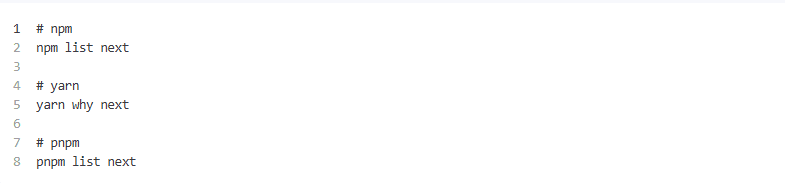
Check the installed version. If it is lower than 15.5.18 or 16.2.6 (depending on your major version), you need to upgrade. Also verify your package.json. If you use caret or tilde ranges (^15.5.0 or ~16.2.0), ensure your lockfile actually resolves to a patched version. Do not assume – check node_modules/next/package.json.
Immediate Actions You Should Take
If your team self-hosts Next.js, patching should be treated as urgent.
1. Update Next.js Immediately
Upgrade to:
- Next.js 15.5.18
- Next.js 16.2.6
- Or newer patched releases
Do not delay this if your application is internet-facing.
2. Block Metadata Endpoints Internally
Even after patching, cloud metadata services should never be openly reachable from application containers unless absolutely necessary.
Restrict access to:
- 169.254.169.254
- AWS IMDSv1
- GCP metadata endpoints
- Azure IMDS
AWS users should also disable IMDSv1 entirely and enforce IMDSv2.
3. Review Reverse Proxy Rules
Check your:
- Nginx configuration
- Traefik setup
- Load balancers
- WebSocket forwarding rules
Misconfigured upgrade headers can sometimes increase exposure.
4. Monitor for Suspicious Internal Requests
Look for unusual traffic patterns involving:
- Metadata IP addresses
- Internal RFC1918 ranges
- Unexpected outbound requests
- WebSocket upgrade anomalies
This is especially important for production clusters handling public traffic.
5. Audit Environment Secrets
If there is any chance your instance was exposed publicly while vulnerable:
- Rotate cloud credentials
- Rotate API keys
- Review IAM activity
- Check audit logs for abnormal access
Do not assume failed exploitation attempts leave no trace.
Why This Keeps Happening
Next.js evolves rapidly. Features like middleware, server actions, WebSocket proxying, and React Server Components expand functionality but also increase the attack surface. When you self-host, you inherit the responsibility of tracking and applying security updates.
There is no substitute for a disciplined patching workflow. Subscribe to Vercel's security advisories. Monitor the Next.js GitHub repository for security tags. Treat major framework updates as potential security events, not just feature releases.
Bigger Problem: Convenience vs Infrastructure Ownership
This incident highlights an uncomfortable reality many teams eventually run into:
“Self-hosting saves money” — until infrastructure maintenance becomes a security problem.
Frameworks like Next.js move extremely fast. That speed is great for developer experience, but it also means self-hosted deployments inherit the operational burden:
- Security patching
- Runtime hardening
- Reverse proxy maintenance
- Dependency management
- Infrastructure monitoring
For smaller teams without dedicated DevSecOps workflows, critical patches can easily get missed.
If you manage critical infrastructure and lack the bandwidth to audit, patch, and harden immediately, consider bringing in support.
Haposoft can help teams:
- Audit Next.js deployments for exposure to known CVEs
- Apply emergency patches with zero-downtime strategies
- Harden cloud infrastructure against SSRF, metadata leaks, and auth bypasses
- Establish automated security workflows for long-term resilience
If you need assistance, reach out through our contact page. We respond quickly to urgent security matters.
Final Thoughts
Modern frameworks are increasingly acting like application platforms, not just frontend tooling. That changes the security expectations dramatically. If you are running Next.js in production outside managed platforms, patch management and infrastructure hardening can no longer be treated as optional maintenance tasks. They are now part of the application lifecycle itself.





.png&w=828&q=75)